

neurodivrgent
Inspiring
July 22, 2024

Meta Quest mobile app is getting a new name and look
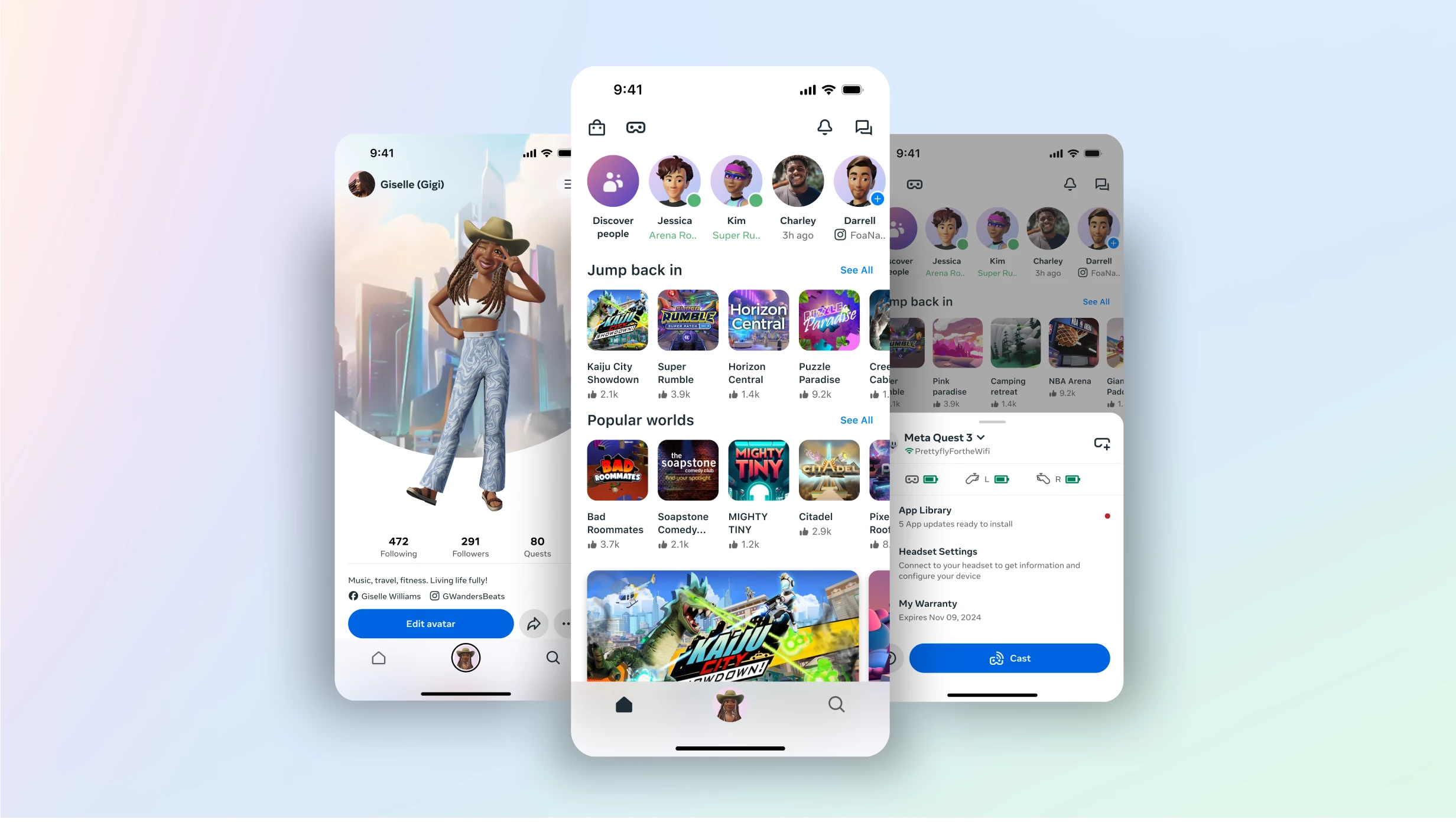
We’ve been making our mobile app better so you can explore experiences easier than ever, right from your phone. 

Here’s what’s new:

  • Dynamic self-expression: Easily refresh your avatar with regularly updated personalization options directly in the mobile app.
  • Explore worlds from your phone: Now you can jump right into new experiences from your mobile app, making it easier to connect with friends over music, games and everything you love.
  • Light mode: Introducing Light mode on the mobile app gives you a more accessible, comfortable and customizable viewing experience. You can update your look anytime from the settings menu in the app.


Don’t worry, we aren’t removing any features or functionality from the current app. You can still manage your headset and browse 500+ mixed reality apps and games from the Meta Horizon mobile app. 

You may need to update your app from your mobile app store, on Android and iOS, to see the latest updates.

Visit https://www.meta.com/blog/quest/horizon-mobile-app/ and our Help Center for more details.

    57 replies

    Inspiring
    October 27, 2024

    Fairly new here. Does this Forum have moderators?

    Are there any downsides/ penalties/ advice  about comments or can we just keep posting garbage and then keep getting informed about "new posts"?

    Do your job moderator!

    Inspiring
    November 16, 2024

    Meta VR Forums...What a joke. No moderators. Full of garbage. Full of folk with no interest in the product and I guess..full of seven year olds. GOODBYE.

    New Participant
    November 22, 2024

    Can you please fix the My Library section of the app? I never get more than the first 9 apps and then a circle of death under it. This happens with both 5G phone and 5G wifi active.

    Also, clicking on friends who own an app only shows a number. I would like to see the names of my friends who also own the app.

    Choleni
    Honored Contributor
    November 22, 2024

    Phaenomenal 

    this happens to me sometimes too.

    I can always fix it by closing the library, then opening devices or anything else.

    Then close that and open library again.....magically all apps are shown now.

    I know, it's not logical and not convenient, but it works....for me at least😅

    New Participant
    December 6, 2024

    where is the option to pair a device by code?

    December 6, 2024

    Blankface345 in the mobile app.

    Connect your headset to wifi, if it failed on pairing headset, it will prompt the manual pairing code. The code is in the your settings, below the software update settings, in the "About" setting for the pairing number 


    December 6, 2024

    A new headset should prompt a pairing code on your screen no Matter, so you can enter

    December 7, 2024

    When launching the app, you will now get a new look, on the new update. The 3 bar on the right side of the search bar is the menu and device management. 


    December 7, 2024

    Casting will popped up if headset on and nearby.


    Choleni
    Honored Contributor
    December 7, 2024

    Anonymous 

    it's weird...I'm one of the last to get updates for the Quests - usually 4 weeks after the rollout starts.
    But my mobile app has been looking like this for a few weeks now😅