
Oculus Debug Tool v210 Incompatible with OVR Runtime v208 – ASW Disabled Setting Does Not Apply (Error -3002)
Oculus Debug Tool v210 Incompatible with OVR Runtime v208 – ASW Disabled Setting Does Not Apply (Error -3002)
Hello Meta Quest Community,
I am experiencing a compatibility issue between the Oculus Debug Tool (ODT) and the OVR Runtime when using Meta Quest Link via USB on my PC.
I am posting this because I have tried multiple troubleshooting steps, including a clean reinstall and testing the Public Test Channel (PTC), but the issue remains unresolved.
1. System and Software Versions
My current software versions are:
-
Headset: Meta Quest 3
-
Connection: Meta Quest Link via USB cable
-
GPU: NVIDIA GeForce RTX 5080 AORUS
-
CPU: AMD Ryzen 7 9800X3D
-
Oculus Debug Tool: 210.0.0.96.541
-
Meta Horizon Link / OVR Runtime: 208.0.0.84.535
2. Main Issue – Version Mismatch
When launching OculusDebugToolCLI.exe, I receive the following error:
Unable to start debug session... mismatch between installed runtime version and SDK version... built against 1.210.0
On the Stable channel, Oculus Debug Tool also displays:
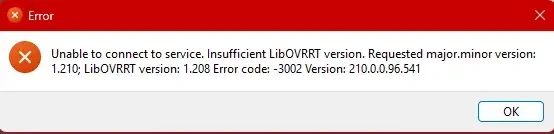
Unable to connect to service. Insufficient LibOVRRT version. Requested major.minor version: 1.210; LibOVRRT version: 1.208. Error code: -3002
This indicates that ODT v210 is attempting to communicate with an OVR Runtime v208 installation.
3. ASW Setting Does Not Apply
My main objective is to permanently disable Asynchronous Spacewarp (ASW).
When I select:
(PC) Asynchronous Spacewarp = Disabled
in Oculus Debug Tool, the setting does not seem to take effect.
I also tested the Public Test Channel (PTC):
-
ODT launches successfully on PTC.
-
However, setting ASW to Disabled still does not appear to apply to the running Link session.
-
The CLI continues to report a runtime/SDK version mismatch.
In other words, PTC allows ODT to launch, but it does not resolve the actual ASW control problem.
4. Troubleshooting Already Performed
I have already tried the following:
-
Completely uninstalled Meta Horizon Link.
-
Removed the remaining installation files.
-
Reinstalled Meta Horizon Link from the official installer.
-
Tested both Stable and Public Test Channel versions.
-
Restarted the PC and Quest 3.
-
Tested the ASW keyboard shortcuts, including Ctrl + NumPad 1.
-
Collected Oculus diagnostic logs and shared them with Meta Support.
Unfortunately, the same version mismatch returns after reinstalling.
5. Meta Support Response
I contacted Meta Support and provided the exact version numbers and error messages.
Support acknowledged the mismatch between ODT v210 and OVR Runtime v208, as well as the fact that the ASW settings fail to apply even on PTC.
They recommended posting on this Community Forum so the engineering team can review the issue, and submitting a formal bug report.
6. Questions for Meta Engineering
I would appreciate clarification on the following:
-
Is Oculus Debug Tool v210 currently incompatible with OVR Runtime v208?
-
Why does the official installer provide ODT v210 while the installed runtime remains at v208?
-
Is this a known issue currently being investigated by the engineering team?
-
Is there a compatible ODT version for Runtime v208?
-
Is there a reliable workaround to permanently disable ASW until the compatibility issue is fixed?
I am not looking for generic troubleshooting steps such as reinstalling the software again. I have already performed a clean reinstall multiple times. The issue appears to be a software version compatibility problem that needs investigation.
I would appreciate confirmation from a Meta engineer or someone experiencing the exact same issue.
Thank you.