
Problems with real size scaling and ground height difference
Hello everyone,
First of all, sorry for my English.
I have some problems making virtual environment in real size.
I spent a couple of days to solve the problem
In my project, player will walk around in real world with oculus, so it is very important to reduce gap between real environment and virtual environment, especially in ground height.
It is hard to describe the difference in words so I link some images.
In order to test, I made a virtual room that is exactly the same size of my test room.
The real room and virtual room look like this
http://postfiles6.naver.net/20150703_37/kimspbabo_1435901337732SigVw_JPEG/KakaoTalk_20150702_191255510.jpg?type=w1
http://postfiles5.naver.net/20150703_36/kimspbabo_1435901337581qtqm8_JPEG/in_oculus.jpg?type=w1
My height is 175cm in real and I put my height in the Oculus Config Utility and my OVRPlayerController prefab is using profile data.
The height of character is almost 175cm and The height of ceiling is 2m70cm(exactly the same as real height).
The ground tile length and width is exactly 30cm.
The eye height in unity is 1.647m and my real eye height is exactly 1.64m.
http://postfiles10.naver.net/20150703_25/kimspbabo_1435901337335jpkso_JPEG/eye_height.jpg?type=w1
The first problem is this. Besides other objects size, the ground tiles in oculus look too small than real tiles.
The tile size and the eye height and IPD are all the same in both real and virtual environment.
I overlapped real tile size image and oculus tile size to show how smaller it looks.
http://postfiles10.naver.net/20150703_153/kimspbabo_1435901337826Ox5jT_JPEG/tile_over_tile.jpg?type=w1
It is about 20% smaller than what it really looks.
Why does this happen and how to solve this?
I think this is really important part in terms of immersion.
Maybe it is intended for something or I am the only one who cares about it..
But I still have to show the player's legs and foot while they are playing to prevent falling down caused by a sense of difference.
So it is important for me and developers who are going to show player's body in oculus maybe.
Reducing skin width did not affect at all.
Just rescaling ground is not an answer because the every objects look smaller when it is under user's head.
If I set my height around 145cm, then the tiles look similar but feels like I am sitting on a chair and the ground is too close.
I have changed FOV in an older version last year but it is blocked(?) in latest version. Also, I am not sure if it is ok to adjust FOV.
The second problem is related to horizon. The horizon seems too high.(It is located at eye height)
When I used oculus very first time, I felt that the horizon is not at the infinite distance but at the somewhere very close.(contradict) So the ground looks like a slight incline in every direction.
The problem is that it also happens even if the ground is not very far.
I set OVRcamera exactly 4m away from the virtual wall and I stand up exactly 4m away from the real wall.
http://postfiles7.naver.net/20150703_214/kimspbabo_1435901337197cU6ML_JPEG/4meters.jpg?type=w1
The result is like this.
http://postfiles10.naver.net/20150703_233/kimspbabo_1435901337475lDjzj_JPEG/in_oculus_with_real_wall.jpg?type=w1
The edge of ground and wall in oculus is about 30cm higher than actual edge.
The edge of wall and ceiling in oculus is about 20cm higher than actual edge.
If I set my height about 190cm, then it seems similar but everything looks smaller like I am looking down and ground is even further.
The problem gets worse when the object or the ground is far away from user. (It goes higher)
Am I the only one who thinks the ground in oculus looks incline?
I have searched internet for some information about horizon.
Theoretically, horizon is located at eye height. In unity, it really is!
But In real world, because the earth is not an infinite sphere, with an eye height of 1m50cm, a person can only see 4.5km away from him. Then, is horizon really at eye height? Not under eye height? ( I am sorry I cannot verify ) Could this be the reason?
What causes this problem and how to fix it?
I wonder if you set your real height in config util and if your eye height is the same, then you do feel like the virtual ground is really right under your shoes. (with eye to neck distance) I have tried hundreds of times with different IPDs, similar but not quite sure. Is there any great idea to check this kind of thing?
The aim of virtual reality is to make the user feel he or she is really in the real place. Right?
Is this kind of problem cannot be solved in unity?
Some kind of Camera Perspective Editor in asset store would be of help?
I also wonder how to change FOV with latest version.
I really could not find answer anywhere.
Thank you for your time about too many questions, genius developers. Anything will do.
Again, sorry for my English.
※I can send my test project if it is needed
First of all, sorry for my English.
I have some problems making virtual environment in real size.
I spent a couple of days to solve the problem
In my project, player will walk around in real world with oculus, so it is very important to reduce gap between real environment and virtual environment, especially in ground height.
It is hard to describe the difference in words so I link some images.
In order to test, I made a virtual room that is exactly the same size of my test room.
The real room and virtual room look like this
http://postfiles6.naver.net/20150703_37/kimspbabo_1435901337732SigVw_JPEG/KakaoTalk_20150702_191255510.jpg?type=w1

http://postfiles5.naver.net/20150703_36/kimspbabo_1435901337581qtqm8_JPEG/in_oculus.jpg?type=w1

My height is 175cm in real and I put my height in the Oculus Config Utility and my OVRPlayerController prefab is using profile data.
The height of character is almost 175cm and The height of ceiling is 2m70cm(exactly the same as real height).
The ground tile length and width is exactly 30cm.
The eye height in unity is 1.647m and my real eye height is exactly 1.64m.
http://postfiles10.naver.net/20150703_25/kimspbabo_1435901337335jpkso_JPEG/eye_height.jpg?type=w1

The first problem is this. Besides other objects size, the ground tiles in oculus look too small than real tiles.
The tile size and the eye height and IPD are all the same in both real and virtual environment.
I overlapped real tile size image and oculus tile size to show how smaller it looks.
http://postfiles10.naver.net/20150703_153/kimspbabo_1435901337826Ox5jT_JPEG/tile_over_tile.jpg?type=w1

It is about 20% smaller than what it really looks.
Why does this happen and how to solve this?
I think this is really important part in terms of immersion.
Maybe it is intended for something or I am the only one who cares about it..
But I still have to show the player's legs and foot while they are playing to prevent falling down caused by a sense of difference.
So it is important for me and developers who are going to show player's body in oculus maybe.
Reducing skin width did not affect at all.
Just rescaling ground is not an answer because the every objects look smaller when it is under user's head.
If I set my height around 145cm, then the tiles look similar but feels like I am sitting on a chair and the ground is too close.
I have changed FOV in an older version last year but it is blocked(?) in latest version. Also, I am not sure if it is ok to adjust FOV.
The second problem is related to horizon. The horizon seems too high.(It is located at eye height)
When I used oculus very first time, I felt that the horizon is not at the infinite distance but at the somewhere very close.(contradict) So the ground looks like a slight incline in every direction.
The problem is that it also happens even if the ground is not very far.
I set OVRcamera exactly 4m away from the virtual wall and I stand up exactly 4m away from the real wall.
http://postfiles7.naver.net/20150703_214/kimspbabo_1435901337197cU6ML_JPEG/4meters.jpg?type=w1
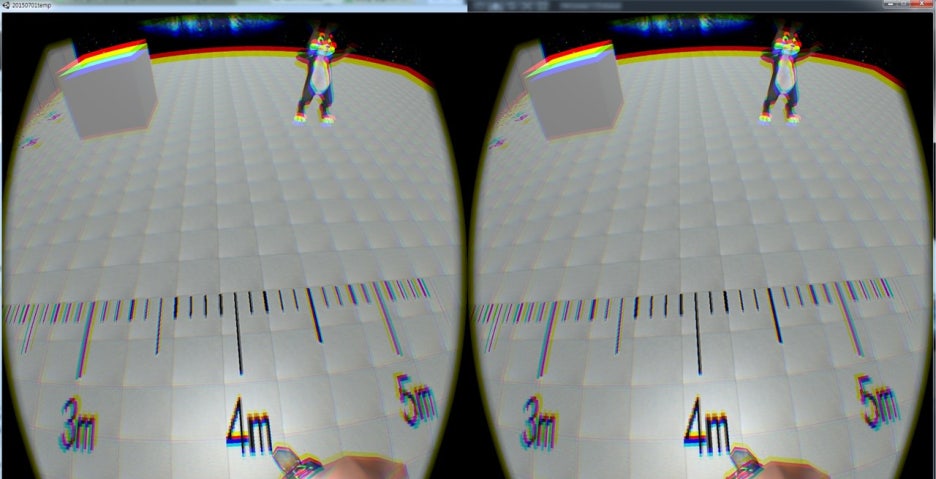
The result is like this.
http://postfiles10.naver.net/20150703_233/kimspbabo_1435901337475lDjzj_JPEG/in_oculus_with_real_wall.jpg?type=w1

The edge of ground and wall in oculus is about 30cm higher than actual edge.
The edge of wall and ceiling in oculus is about 20cm higher than actual edge.
If I set my height about 190cm, then it seems similar but everything looks smaller like I am looking down and ground is even further.
The problem gets worse when the object or the ground is far away from user. (It goes higher)
Am I the only one who thinks the ground in oculus looks incline?
I have searched internet for some information about horizon.
Theoretically, horizon is located at eye height. In unity, it really is!
But In real world, because the earth is not an infinite sphere, with an eye height of 1m50cm, a person can only see 4.5km away from him. Then, is horizon really at eye height? Not under eye height? ( I am sorry I cannot verify ) Could this be the reason?
What causes this problem and how to fix it?
I wonder if you set your real height in config util and if your eye height is the same, then you do feel like the virtual ground is really right under your shoes. (with eye to neck distance) I have tried hundreds of times with different IPDs, similar but not quite sure. Is there any great idea to check this kind of thing?
The aim of virtual reality is to make the user feel he or she is really in the real place. Right?
Is this kind of problem cannot be solved in unity?
Some kind of Camera Perspective Editor in asset store would be of help?
I also wonder how to change FOV with latest version.
I really could not find answer anywhere.
Thank you for your time about too many questions, genius developers. Anything will do.
Again, sorry for my English.
※I can send my test project if it is needed