
Quick solution to UDK stereo by default
Stereo by default in UDK seems to be the first problem whenever someone wants to try an UDK game or demo. The player either has to modify the .ini file or enter console commands. And this is not really acceptable if you want your game to look pro.
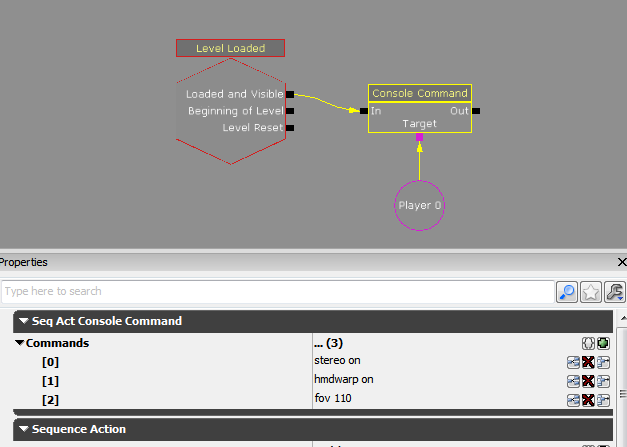
I don't know if this problem has been solved yet, so I am currently working on it. I tried a really simple thing with the Kismet editor. When the game is loaded, the commands stereo on, hmdwarp on and fov 110 are automatically entered. (I don't know if fov 110 is really nescessary though)
Here is the Kismet sequence you have to create in your game:
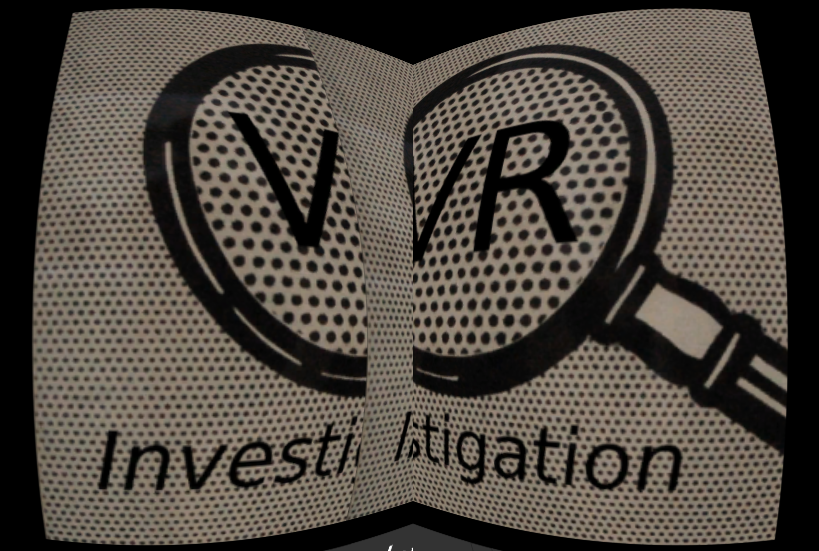
The result is not perfect yet. As you can see, the two views overlap themselves. Anyone know if there is a console command to change the distance between the views? I'll be researching on it in the meantime.
I don't know if this problem has been solved yet, so I am currently working on it. I tried a really simple thing with the Kismet editor. When the game is loaded, the commands stereo on, hmdwarp on and fov 110 are automatically entered. (I don't know if fov 110 is really nescessary though)
Here is the Kismet sequence you have to create in your game:
The result is not perfect yet. As you can see, the two views overlap themselves. Anyone know if there is a console command to change the distance between the views? I'll be researching on it in the meantime.