
Meet Pinch Puzzle: A Minimalist Tabletop Puzzle Built for Quest
Pinch Puzzle is my entry for the Start Developer Competition (Gaming): a calm, seated puzzle you play with nothing but your hands.
Pinch a shape, carry it to its glowing ring, let go. It snaps in with a note. Six boards, from 3 pieces to 8, about 10 minutes end to end. A see-through ghost hand teaches the pinch in the first few seconds, so there is nothing to read.
Built for comfort and access:
- Hands only, one hand is always enough
- Seated, everything within easy reach
- No timers, no fail states
- Shape plus colour on every piece, never colour alone
- Comfort panel: table height and distance, high contrast, music
Play it now, no install: Pinch-Puzzle
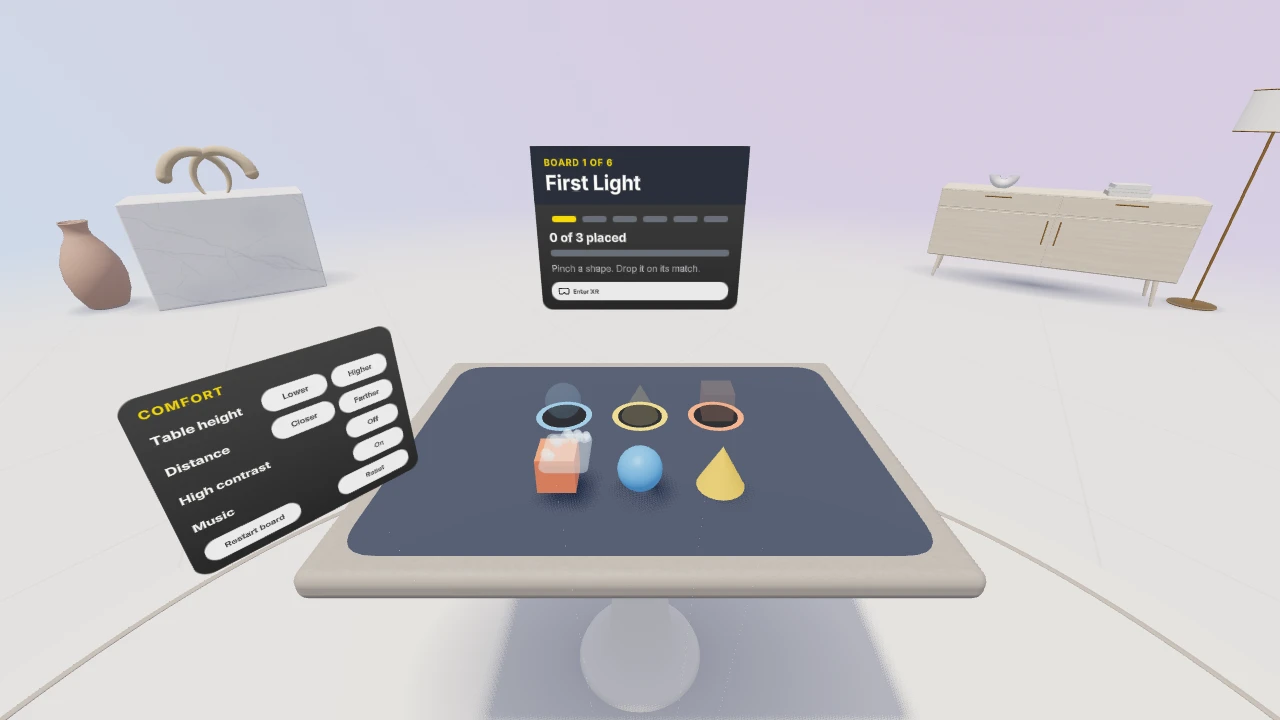
Open in the Quest Browser, press Enter XR, set the controllers down.
It is fully playable in the IWSDK emulator, and I am collecting first impressions from real headsets this week. If you try it, one line on how the pinch felt and whether it ran smoothly would mean a lot. Happy to return the favour on your project.