ZippyZippo
Inspiring
Oct 30, 2026 6:34 AM UTC
Solved

Oculus Rift-S works until removed for a Short Break, then OculusDash Error Crashes Headset

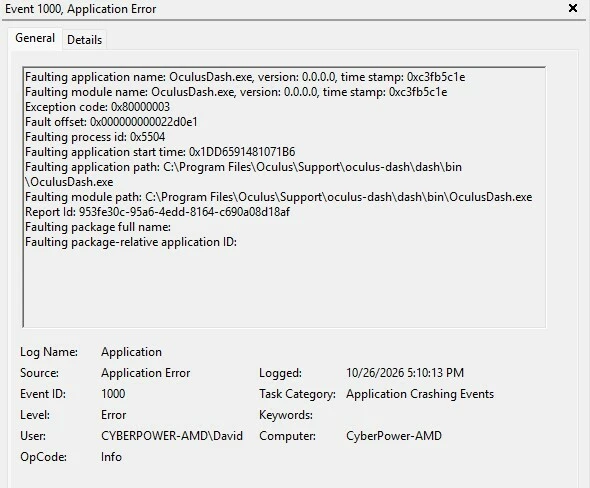
My Rift-S had been functioning fine until a “Meta” update in early September.  When using the Rift-S playing any game is fine as long as the headset remains on.  If removed for any reason to take a break etc, the headset led will go from white to orange when attempting to place back on resulting in an OculusDash error.

OculusDash Crash


All devices in Device Manager are set to NOT allow “Power Management” to shut them off, and the video driver being used is from December 2025. 

There should be a version or package for Rift-S users that is a “final” supported version that “Meta-Link” software would just ignore and leave alone.


Anyone have an idea or cure?  Have tried most suggestions.


Thanks,

Dave


    ZippyZippo
    Inspiring
    Nov 1, 2026 3:39 AM UTC

    Did the DDU removal and install of the latest NVidia drivers for RTX 5080 card and still will lock the headset up if I take off for a break.  Working with Grok I tried pretty much everything that Grok came up, including putting it on my old VR Gaming box with an RTX 3080 and Intel CPU to make sure it wasn’t related a hardware issue.  It did the same thing if I took off the headset during a game and set it aside for a break.  As soon as I picked it up the LED goes orange and it’s non-reponsive.


    Anyway my work around which is weak but works, is hang it on a bungee cord and turn a small fan on which keeps it moving enough that I can take a break, grab a drink, then put it back on and continue.  Grok’s conclusion below.


    Debug Tool bypass also failed

    Same crash after enabling Bypass Proximity Sensor Check:
    Exception 0x80000003 at offset 0x22d0e1 in D:\Meta Horizon\Support\oculus-dash\dash\bin\OculusDash.exe.

    All software paths exhausted

    • Registry DisableProximitySensor (multiple locations)
    • Oculus Debug Tool proximity bypass
    • Clean Meta Horizon reinstalls
    • Cross-PC reproduction
    • USB/power/Game Bar changes

    The idle-detection path inside OculusDash (proximity/presence off + no significant IMU motion) still reaches the breakpoint. No remaining documented toggle, flag, or tool suppresses it in current builds.

    Final practical options

    • Motion workaround — Keep the headset in continuous light motion after removal (the only method you confirmed prevents the crash).
    • Cable swap — Test a different official Rift S cable if available.
    • OculusKiller — Only if you primarily launch via SteamVR; it replaces OculusDash.exe so the crashing process never runs. Back up the original first.
    • Accept the limit — Rift S is end-of-life. The signal that drives the removed+idle state is faulty at the hardware level (sensor, internal connection, or cable), and current OculusDash has no bypass left.

    12 replies

    ZippyZippo
    Inspiring
    Oct 30, 2026 7:29 PM UTC

    Sorry I placed in the wrong forum.

    New Participant
    Oct 30, 2026 9:38 PM UTC

    Did you resolve this. I have been battering Chat GPT for assistance!


    steve40
    Honored Contributor
    Oct 31, 2026 7:00 AM UTC

    The folder path should be Meta Horizon, not Oculus, which means you are using a legacy version. Fully uninstall the Link software and delete the relevant user folders (search the forums for clean uninstall instructions) then download a fresh copy from Meta and install it.

    ZippyZippo
    Inspiring
    Oct 31, 2026 7:34 PM UTC

    Thank You, that was going to be my next step after playing with Grok yesterday that when the “change over” to Meta Horizon occurred it left it in a mixed state.

    ZippyZippo
    Inspiring
    Oct 31, 2026 10:12 PM UTC

    Well did the complete cleanup, removal of old directories and registry entries, but no dice….


    steve40
    Honored Contributor
    Oct 31, 2026 11:43 PM UTC

    the video driver being used is from December 2025

    If you have an Nvidia GPU, try the latest version 621.01, it has fixes for Horizon Link. Do a clean driver uninstall using DDU first.

    ZippyZippo
    ZippyZippoAuthorAnswer
    Inspiring
    Nov 1, 2026 3:39 AM UTC

    Did the DDU removal and install of the latest NVidia drivers for RTX 5080 card and still will lock the headset up if I take off for a break.  Working with Grok I tried pretty much everything that Grok came up, including putting it on my old VR Gaming box with an RTX 3080 and Intel CPU to make sure it wasn’t related a hardware issue.  It did the same thing if I took off the headset during a game and set it aside for a break.  As soon as I picked it up the LED goes orange and it’s non-reponsive.


    Anyway my work around which is weak but works, is hang it on a bungee cord and turn a small fan on which keeps it moving enough that I can take a break, grab a drink, then put it back on and continue.  Grok’s conclusion below.


    Debug Tool bypass also failed

    Same crash after enabling Bypass Proximity Sensor Check:
    Exception 0x80000003 at offset 0x22d0e1 in D:\Meta Horizon\Support\oculus-dash\dash\bin\OculusDash.exe.

    All software paths exhausted

    • Registry DisableProximitySensor (multiple locations)
    • Oculus Debug Tool proximity bypass
    • Clean Meta Horizon reinstalls
    • Cross-PC reproduction
    • USB/power/Game Bar changes

    The idle-detection path inside OculusDash (proximity/presence off + no significant IMU motion) still reaches the breakpoint. No remaining documented toggle, flag, or tool suppresses it in current builds.

    Final practical options

    • Motion workaround — Keep the headset in continuous light motion after removal (the only method you confirmed prevents the crash).
    • Cable swap — Test a different official Rift S cable if available.
    • OculusKiller — Only if you primarily launch via SteamVR; it replaces OculusDash.exe so the crashing process never runs. Back up the original first.
    • Accept the limit — Rift S is end-of-life. The signal that drives the removed+idle state is faulty at the hardware level (sensor, internal connection, or cable), and current OculusDash has no bypass left.
    Participant
    Nov 1, 2026 4:07 AM UTC

    Since a July update for the Meta Horizon Link software...Just got a q pro instead of dealing so guess it worked 🙄...


    ZippyZippo
    Inspiring
    Nov 1, 2026 7:06 PM UTC

    Thanks, I never saw your post while searching.  As much as I really wanted another alternative, I may wait for the Meta VR Glasses in the spring.  Not cheap, but they claim PC Gaming compatible.  If not well reviewed I may opt for the q pro as well.