

Horizontal Lense Separation Observations
The #1 thing IMO that affects the quality of the experience for many people is the lense separation and the fact that for the best experience you want a perfect alignment of eye -> lense -> distortion shader centre. There have been some people modifying their kits like this. But without also offsetting the centre of the distortion and or the position of the Quad to ensure everything aligns it's still not going to be perfect.
The Consumer Kit promises a way of adjusting the lense separation but this is also going to require everyone to add support to their games/demo/apps to match the offset. This is something I want to add to Lunar Flight right now but have yet found a way to offset the Quad or a specific formula that accounts for the different needs depending on the separation.
I built a scale model setup in 3DSMax and rendered the possible offset extents in an orthogonal view. It isn't 100% accurate but its a very close approximation based on my measurements. The panel dimensions were based on a 1280x800 screen capture and then creating a plane with the same dimensions, this was then scaled to the correct width of the panel which I determined as 17.8 cms (7 Inches)
The lenses were measured, both height and radiuses and position in the centre of the panel with the default 65mm separation.
For reference, this Wiki page has a US Army IPD sample range which ranges from 52mm to 78mm
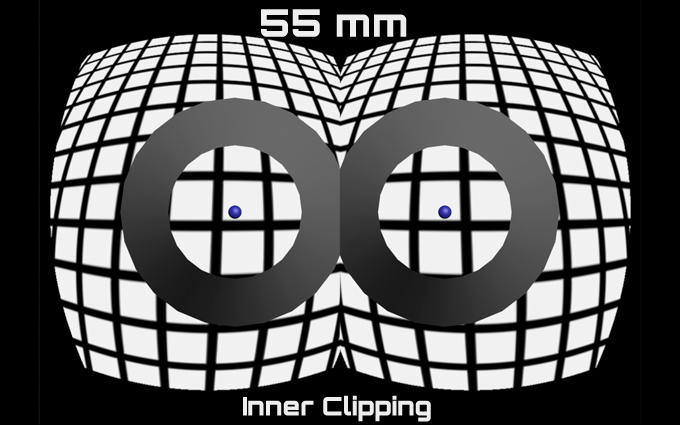
At 55mm the lenses would need to accommodate the inner clipping problems.
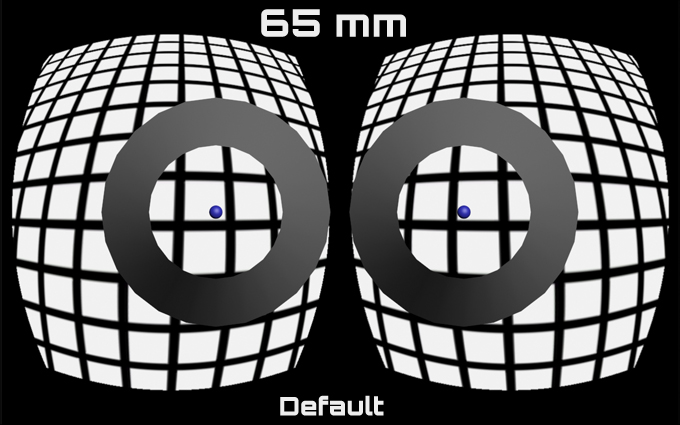
The default, I'm not 100% sure its 65mm but I keep reading different things, I think the lenses are 65 but the software camera separation is 64 mm.
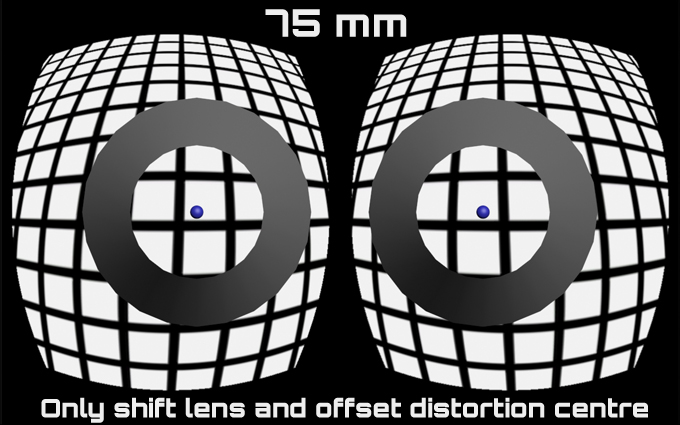
At 75mm you wouldn't need to shift the screenspace quad coordinate instead you would adjust the centre of the distortion shader to line up with the lense. This is only for illustration purposes It is not adjusted in this image.
The Consumer Kit promises a way of adjusting the lense separation but this is also going to require everyone to add support to their games/demo/apps to match the offset. This is something I want to add to Lunar Flight right now but have yet found a way to offset the Quad or a specific formula that accounts for the different needs depending on the separation.
I built a scale model setup in 3DSMax and rendered the possible offset extents in an orthogonal view. It isn't 100% accurate but its a very close approximation based on my measurements. The panel dimensions were based on a 1280x800 screen capture and then creating a plane with the same dimensions, this was then scaled to the correct width of the panel which I determined as 17.8 cms (7 Inches)
The lenses were measured, both height and radiuses and position in the centre of the panel with the default 65mm separation.
For reference, this Wiki page has a US Army IPD sample range which ranges from 52mm to 78mm
At 55mm the lenses would need to accommodate the inner clipping problems.
The default, I'm not 100% sure its 65mm but I keep reading different things, I think the lenses are 65 but the software camera separation is 64 mm.
At 75mm you wouldn't need to shift the screenspace quad coordinate instead you would adjust the centre of the distortion shader to line up with the lense. This is only for illustration purposes It is not adjusted in this image.