
February 19, 2014

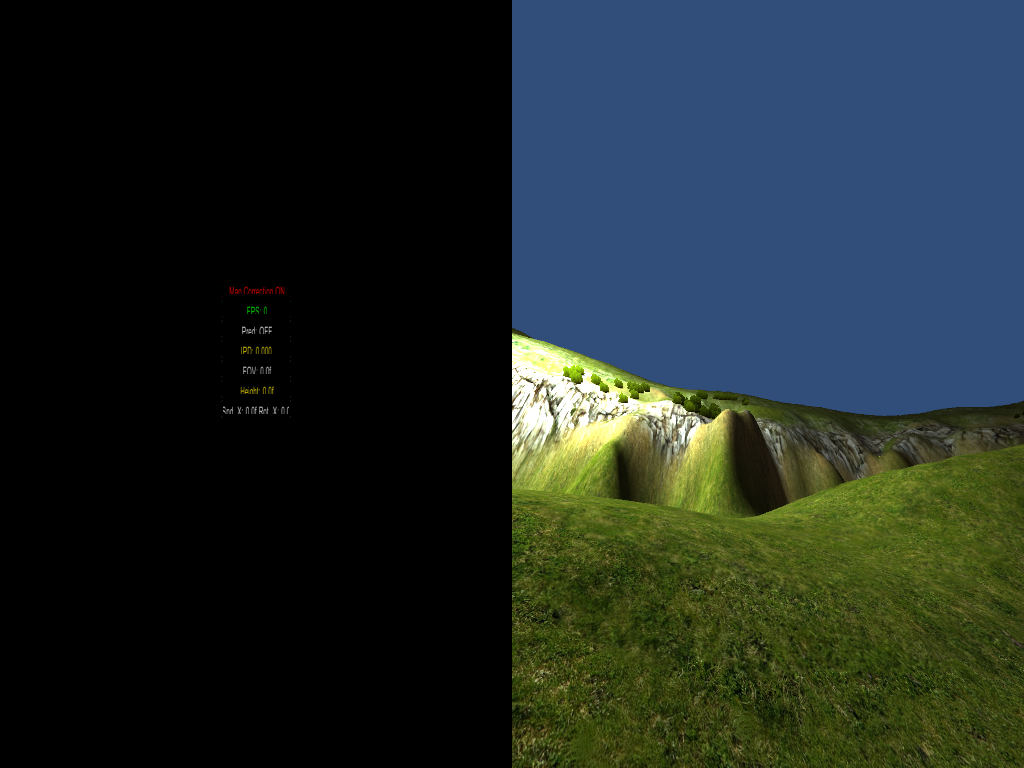
What is this and how do I get rid of it?

I don't know what I'm doing at all. I've been searching for a few hours trying to figure out what this is called but to no avail. So can someone please tell me what to do to get rid of this screen. I get to play my scene in 3D for about 10 seconds and then the screen goes half black with a menu. I've pressed every button even while holding shift and alt. I'm a complete noob master. I'm about to bola this OR through my window. It doesn't come up when I play other people's games...THANK YOU.
    13 replies

    Inspiring
    February 19, 2014
    Haven't seen this one before. Maybe it would help if you post a little bit more information about what your scene hierarchy looks like. Do you get the problem if you start with a fresh scene and drop an OVRPlayerController into it?
    Titans of Space PLUS for Quest is now available on DrashVR.com
    Up and Coming
    February 19, 2014
    The "menu" you're seeing is just an info dialog that shows frame rate and a few other tidbits of information. By default, it is toggled with the spacebar, I believe.

    You're probably not using the correct camera for stereo rendering in Unity. For the fastest integration into a scene, use the OVRPlayerController prefab. This will give you first-person-perspective style control with stereo cameras.
    February 19, 2014
    yes....It's very basic. All this is the terrain from Tuscan and a point of light. Here is what it looks like when I just press play.
    Any help would be cool... If not, I'll live though. Thanks again.


    Inspiring
    February 20, 2014
    Are you using Unity Free? Because you need the Pro version to use the Rift.
    AMD Ryzen 7 1800X | MSI X370 Titanium | G.Skill 16GB DDR4 3200 | EVGA SuperNOVA 1000 | Corsair Hydro H110i Gigabyte RX Vega 64 x2 | Samsung 960 Evo M.2 500GB | Seagate FireCuda SSHD 2TB | Phanteks ENTHOO EVOLV
    February 20, 2014
    yeah..free version... so........ lol...that may be the problem then. Thanks.
    Up and Coming
    February 20, 2014
    https://developer.oculusvr.com/forums/viewtopic.php?f=37&t=4496

    If it's just for playing with Unity/developing your own projects then I'm sure it will be fine. But if you're planning to release anything then I think you're going to need Unity Pro (you do get a 4 month Unity Pro trial key when you purchase the Rift).

    Hope this helps.
    February 20, 2014
    Thanks...I tried it out the free trial and problem still persist. I've tried removing and reinstalling Unity 3 times. I have no plans on releasing anything, I just wanted to walk around in some worlds I made. Oh well... Thanks for your time guys.
    Inspiring
    February 20, 2014
    Do you have the Rift connected and working?

    Because I don't see the warping, which would happen if you don't have a Rift.
    AMD Ryzen 7 1800X | MSI X370 Titanium | G.Skill 16GB DDR4 3200 | EVGA SuperNOVA 1000 | Corsair Hydro H110i Gigabyte RX Vega 64 x2 | Samsung 960 Evo M.2 500GB | Seagate FireCuda SSHD 2TB | Phanteks ENTHOO EVOLV
    February 21, 2014
    HAHA....I think you figured it out.... I DO have a Rift and it is working properly with demos and games just not the ones I compile. I never even noticed the computer monitor wasn't warping like other games until you said that. Big face palm in real life. I watched a tutorial and it lead me to believe all I need to do is drag and drop the OVRplayercontroller into the game and it would be OR ready. During the 10 seconds it gave me to actually see the scene I rapidly closed each eye back and forth and it is definitely NOT two different images but the same. So......back to the old drawing board. I guess there is more to it than just dropping that OVRPlayercontroller and playing. Thank you for your time. Very much appreciated.
    February 21, 2014
    The only thing I can't figure out is that when I compile the premade Tuscany scene it still does the same thing. So maybe i'm just compiling wrong since it was premade to work.