

neurodivrgent
Inspiring
July 8, 2024

Meta Quest build v67 release notes
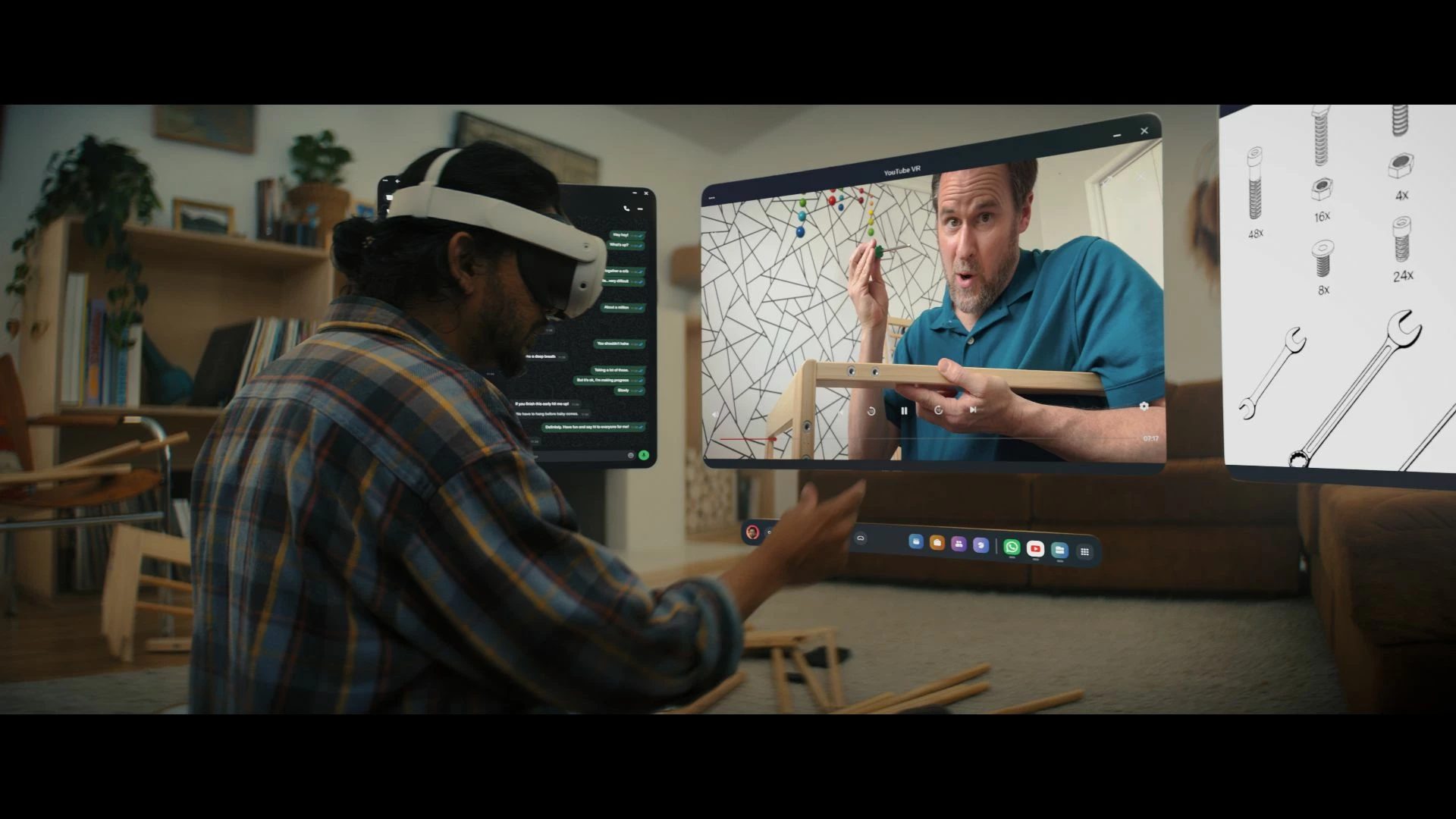
These features and enhancements are becoming available starting this week of July 8, 2024 and are pushed to Meta Quest 3, Meta Quest Pro and Meta Quest 2 headsets. Please note that you can find the most up to date release notes on our release notes article and you can check out our v67 blog as well for more details.

New window layout

 
We’re adding the ability to move windows around when you have multiple apps open in your headset. You can reposition windows anywhere. You can also watch content on a large screen by selecting the theater view on any window’s control bar.

You can find this feature under Experimental in Settings.


Creator content in Horizon Feed


We’re introducing new creator videos to Horizon Feed. You can connect with creators through reactions and sharing and jump into games and experiences directly from content in your Feed. If you are an active creator on other social networks and are interested in participating as a publisher, please let us know in the Meta Quest Community Discord.

  • This feature is rolling out gradually


Swipe Typing


We’ve added the ability to use swipe typing to enter text when using your headset. Cut down on typing by sliding your finger or cursor from letter to letter to spell words. You can turn this feature on by going to Settings, then System, then Keyboard and selecting the toggle next to Swipe Typing.


Eye tracking improvements (Quest Pro only)


We’ve made further improvements to eye tracking on Quest Pro. For the most accurate eye tracking, you can always recalibrate by going to Movement tracking in Settings, then Eye tracking and selecting Calibrate next to Calibrate eye tracking.


Do Not Disturb improvements


We’ve made a number of improvements to the Do Not Disturb setting. You can now select different durations for Do Not Disturb. You can turn this feature on from Quick settings. If you have Do Not Disturb turned on, you can also control this feature from Notifications.


Wi-Fi QR code scanner (Quest 3 only)


You can now scan a Wi-Fi QR code to connect to a valid Wi-Fi network with your Quest 3 headset. To scan a QR code, go to Wi-Fi in Settings and tap Scan QR Code.


Immersive media continuity

You can now open Quest TV or use File Viewer to watch immersive videos without quitting your current immersive app.

78 replies

Participant
July 12, 2024

NeedForLightSpeed OK, now I understand your opinion - that's true!
But I also think, that directly using the cameras through apps would be a hefty security concern.

For what purpose you would like to use these cameras?

TomCgcmfc After reading your post, I've also checked my Q3 and... there it is!
Q3 and LinkApp versions are the same than yours after 2nd update (Q2 also same as Q3).

But there is one question - did the 2nd restart also take so much time with yours devices?
After round about (felt) 15min I've aborted it on the Q2... with no side effects.
After switching to Q3, it shuts down on itself and after restart there was no pendig update anymore.

So I have to restart the process on Q2 and should be more patient next time ;D

NeedForLightSpeed
Up and Coming
July 12, 2024

Buetigame I'm a start-up founder / research engineer, so custom computer vision code is core to my product. It's not possible to replicate my functionality with OpenXR extensions. Having passthrough and depth + mesh API is a good start, however for people like myself who have our own code, we want full camera access. Just like say any iOS or Android phone allows for in 2024. 

My issue is with the juxtaposition of security concerns, yet I can literally scan QR codes, record 2D or 3D video with my Meta Quest 3 of my bedroom and sure, I trust Meta, that's not my point, but my point is, why can't developers also have the same access/trust. 

Participant
July 12, 2024

NeedForLightSpeed As I've wrote before... I understand your opinion.
But as a customer I'd feel much more safe, if only one instance could control the cameras.
And you can belive me, I didn't trust Apple/Google at all - as you've gave one more reason not to do so.

TomCgcmfc Also the Q2 didn't want another update (or continue the one aborted).
So everything is fine now and even AirLink works as a charm!

Participant
July 13, 2024

When will have mobile asw on quest link???it has been remove over than 8 months,the pc asw looks really bad,in skyrim ets2,the graphic always float around,the ssw of virtual desktop are significantly better.

Honored Contributor
July 13, 2024

Recently updated to v67.

Problem with having to re-pair AirLink after power off seems resolved.

Tried new Windows layout. Jury is still out this on. Didn't much care for the touch-mode interface, seems a variation on that feature. Like the big screen mode for videos.

Prior to the v67 update I had two power off updates (the ones that don't seem change version numbers). First one (small update) broke Voice Control (reported with logs and video). The second a day or two later (large update) fixed VC. Wish There was some log on what these updates are changing.

But good work for fixing the problem quickly.

Inspiring
July 15, 2024

My Q2 updated and I haven't had any issues.

Just tried the new window layout experiment and it needs a little tweaking, when enabled the view mode button disappears so this needs and will probably be added to that view mode button, a little flyout with the modes would be good.

The windows need to allow you to bring them closer to you, maybe some view mode settings to adjust the angle of the windows.

I'm really impressed with the new window layout though.

Up and Coming
July 15, 2024

Interesting that something very cool that came with this version was left out. For the first time in the helmet you are not only two pairs of white hands, but also have arms and a torso. 🙂

MetaStoreHelp
Community Manager
July 17, 2024

Hey there Artins, running into battery indicator complications after the V67 update can surely interrupt the best VR experience! We understand the importance of knowing the accurate battery percentage and would be glad to work with you on finding solutions. So we don't repeat steps already taken; what troubleshooting have you already attempted?


We look forward tp assisting you!

If you're the author of a thread, remember to mark a reply as the Accepted Solution to help others find answers!
Participant
July 17, 2024

The new window layout is great and a big step forward in particular combined with the new hidden boundaries. 

What totally kills the experience for me is when watching a movie I almost don't know where to put my hands to not accidentally interact with. Is there a way to disable the hand interactions? Would be nice if there's an hand gesture to silence/disable interactions (like gaze/pointing). 


MetaStoreHelp
Community Manager
July 17, 2024

Hey there Artins! Just wanted to check in to see if you saw our last message? RobbenB, we want you to enjoy those movies in peace, so we wanted to provide an article on how to disable hand tracking! Let us know if this helped!

If you're the author of a thread, remember to mark a reply as the Accepted Solution to help others find answers!