

MetaStoreHelp
Community Manager
April 7, 2026

Navigator Now Rolling Out to All Quest Users
  • April 7, 2026
  • 309 replies
  • 13718 views

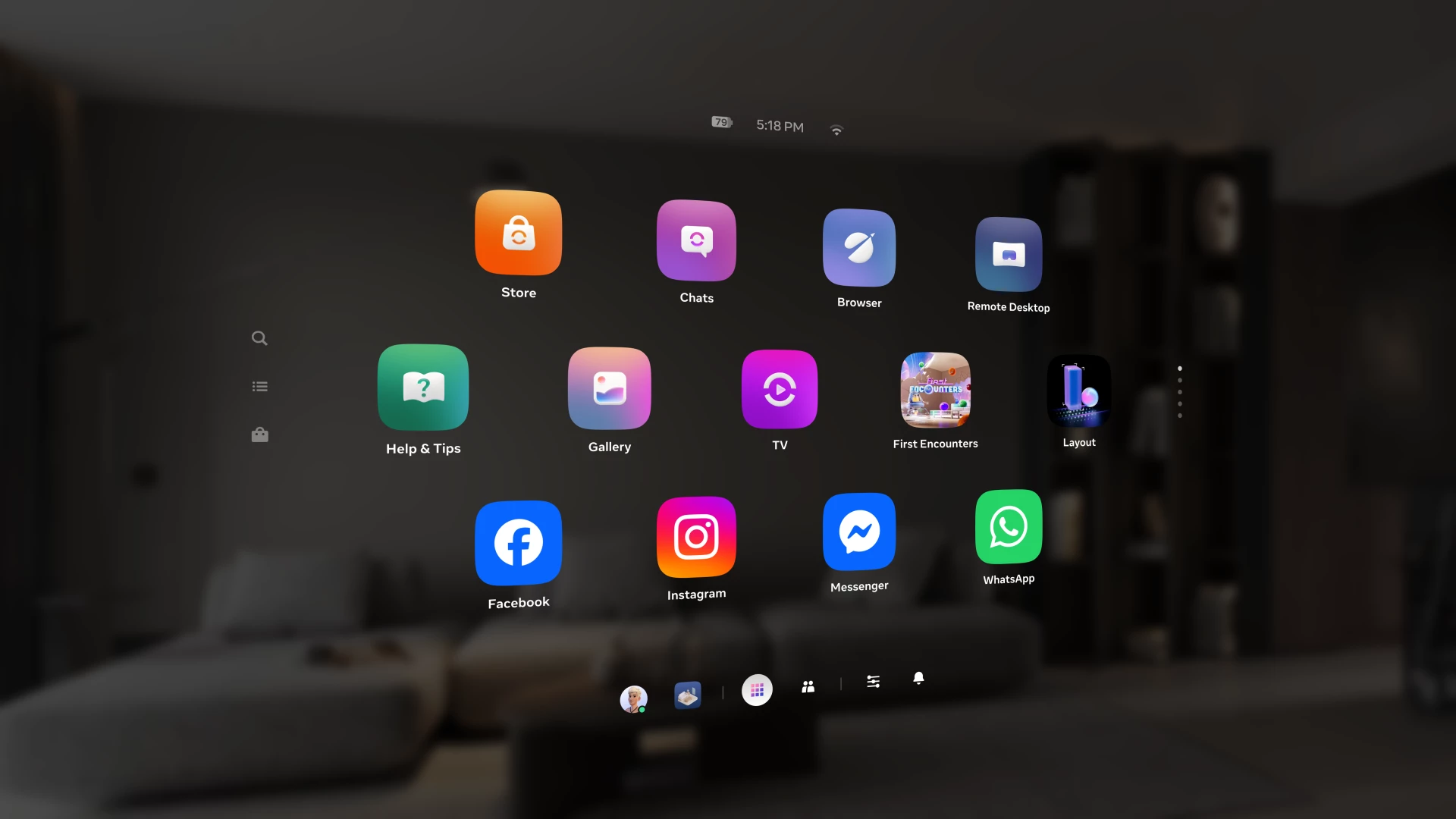
Over the past year, we've been building Navigator β€” a redesigned interface that brings your apps, people, and system controls together in one place. Since we first introduced Navigator, we've heard your feedback and continued to refine the experience. Navigator is now rolling out to all Meta Quest users.

Navigator is now the default navigation experience, replacing the previous Universal Menu to give you a faster, more streamlined way to access everything on your Quest. 

  • One Unified Interface: Press the Meta button to open Navigator. Your apps, settings, and people are all accessible from one place. 
  • Guided Walkthrough: The first time Navigator appears, an in-headset walkthrough will guide you through the new experience so you can get up to speed quickly.

Thank you to those of you who provided your valuable input as we worked to get Navigator ready for broad rollout. Visit the How to use Navigator on Meta Quest | Quest Help to learn more about Navigator, and let us know what you think in the comments.

    This topic has been closed for replies.

    309 replies

    New Participant
    April 7, 2026

    genuinely revert this trash ui update 

    EnricSant
    New Participant
    May 13, 2026

    I was looking for a message to answer and check if my account works well, this is the perfect place.  thanks. :) 😁

    Honored Contributor
    April 7, 2026

    At first I preferred the old one, though over time I've gotten used to the new Navigator. It's been helped by the fact that Worlds isn't being pushed in our faces anymore. Looking forward to seeing Navigator being refined some more over time. 

    steve40
    Honored Contributor
    April 8, 2026

    OMG I have Navigator!!! I rather like it. But is there any way to grab and move the library? I can do it with all other apps except the main Navigator screen, which is a hassle. I have to press the Meta button, look where I want to move the Navigator to, then press the Meta button again.

    We still don't have Navigator on Grace's headset.

    Honored Contributor
    April 8, 2026

    steve_40 I couldn't do it either. 😁. Maybe it will come. I'm sure Grace will get Navigator soon. Seems to be rolling out quickly. One of my local group of friends doesn't have it yet. She's feeling very jealous. I've suggested that she complain to The Ministry of Overreaction. πŸ˜‚πŸ˜‚ 

    New Participant
    April 7, 2026

    Really hate the Navigator and more hate not being given a choice. Give us back the original screens.


    Honored Contributor
    April 8, 2026

    KyDog17 I preferred the old one too but I got Navigator 6 updates ago and got used to it. I suppose it's like our mobile phone, Android or iPhone, they just change everything and we can't go back to the old one. That's life I suppose. Don't sweat the small stuff. 

    New Participant
    April 8, 2026

    Give me back my normal UI, this "navigator" is genuinely most horrible UI i have ever had a displeasure of using. It's really, really horrible, idk who designed it but he/she should be fired and not work as UI designer again. 


    Like seriously, what were you thinking? You looked at Microsoft and thought πŸ€” they make everything worse, let's do it too.


    Honored Contributor
    April 8, 2026

    MadMan1412​ It's not coming back unfortunately. I preferred the old one too but I've had Navigator since v79 and got used to it. Believe me, it was even worse back then! But just as our phones change with new updates, so does our headset. I'm philosophical about it at this stage, I can find my games, I don't have to have the awful Worlds smacking me in the face every time I switch on. As the saying goes, don't sweat the small. Maybe getting rid of Worlds bloatware made me a bit more positive. Every cloud has a silver lining! 😁 

    New Participant
    April 8, 2026

    This new "Navigator" is absolutely atrocious. It is Anti-UI. Where is the option to switch it off and use the PROPER UI?? Nobody asked for this!

    New Participant
    April 18, 2026

    I completely agree. They call it streamlined, but its actually the opposite. With the old UI everything people commonly used was 1 click away, now it can take as many as 3 clicks to get to daily use items. And, things aren't even logically grouped.  On top of the fact that you can only see the first word and a half of an app title, some messages contain HTML tags (not properly formatted), and the fact that instead of scrolling through the apps list they flash from page to page (nauseating for many users). In my 40+ years of using computer interfaces this one is in the top 5 most user unfriendly. Its like Meta is trying to drive users to other platforms intentionally.


    New Participant
    April 8, 2026

    Hi, i play competitivly; i going into a thing, got my headset crashed then once i rebooted it, i had this whole new ui, the quest call we were using, I can't turn the volume down, for someone with sensitive hearing this is a very large issue, i open the game, now i cannot close the menu just have to toss it over my head and hope i dont grip and pull it into my face. 


    There are sooo many issue with this, i tried going through experimental to turn it off, there was no option to, i got no option to even agree to screwing over my entire ui. Im looking into ways to roll back the update on my end. But for the love of the dwindling support you guys have please do not do this.

    Honored Contributor
    April 8, 2026

    That's not good. What version are you on. v2.1 or v2.3?  In the meantime as a temporary though not ideal solution, maybe use some low level protection earplugs or use earphones where you can lower the volume independently of the headset? 

    Participant
    April 8, 2026

    And it ruined everything possible. VD was acting up ever since I had to update to v201. With v203, I was not able to connect to my PC via my dedicated wifi 6 router (which has no internet). Had to fetch the token with my 2.4GHz router once, switch over to my dedicated router, and use VD as I used to do FOR 2 BLOODY YEARS without doing any additional steps. Now ... with the new stolen apple UI, nothing is working anymore with my dedicated router. The UI is trash, it is clunky as HELL, and you make things worse!

    steve40
    Honored Contributor
    April 8, 2026

    Wow. That post is basically a rage‑powered word salad tossed in a bowl of technical misunderstandings. Nothing in it makes any sense and your router and Virtual Desktop have absolutely nothing to do with Navigator. Nice work.

    Honored Contributor
    April 8, 2026

    steve_40​ Steve!! Direct him to the Ministry of Broken Virtual Desktop! Maybe he can also go next door to The Ministry of Overreaction. πŸ˜‚πŸ˜‚ 

    Montago
    Participant
    April 8, 2026

    The new UI needs Settings !!

    • Adjust dimming when viewing app list
    • Adjust opacity, i would like it to be more opaque instead of transparen
    • Fixate app list to Headset instead of World (let the apps follow the view) (as an option) or at least let it follow you around. 
    • Ability to always show footer on the 2D windows
    • Tabs on the app list : Favorites, Games, Applications, Sideloaded, Hidden
    • Let the list of favorites be unlimited instead of fixed at eg 5-8-10 apps
    New Participant
    April 26, 2026

    give us the old interface back

    steve40
    Honored Contributor
    April 8, 2026

    🎭 The Ministry of Overreaction Presents: "The Navigator Nuisance"

    [Scene: A drab government office. A sign reads: "MINISTRY OF OVERREACTION - Complaints Division." A clerk sits behind a desk, stamping papers with unnecessary force.]

    Clerk: Next! State your complaint, and please keep it within the internationally accepted limits of melodrama.

    First User (bursting in, waving a headset): This new Navigator UI is the worst thing to happen to humanity since unsliced bread! I demand it be removed, reversed, rolled back, and possibly exorcised!

    Clerk: Very good, very good. Level 3 Overreaction. Please take a pamphlet titled "Breathing Through Minor Inconveniences." Next!

    Second User (storming in with the energy of a man who stubbed his toe in 1994 and never recovered): It's Anti-UI! Anti! I pressed a button and something happened! I didn't ask for this! Nobody asked for this! I want the old UI back - the one I complained about last year!

    Clerk: Excellent commitment. That's a Level 4 Nostalgic Outrage. Next!

    Third User (dramatically clutching headset like Hamlet with Yorick's skull): My volume button moved three millimetres and now my life is RUINED. RUINED, I tell you! I had to… adapt.

    Clerk (gasps): Adapt? Good heavens, man, this is a Ministry of Overreaction, not a support group for the emotionally resilient. Next!

    Fourth User (entering with a scroll): I have prepared a list of 47 grievances, 12 demands, and a small poem about opacity settings.

    Clerk: Splendid. We do appreciate a well‑formatted rant. Next!

    Fifth User (whispering, trembling): I… I actually like the new UI.

    [The room falls silent. Papers stop mid‑stamp. A tea cup shatters in the distance.]

    Clerk (leaning forward): I'm sorry… what did you say?

    Fifth User: I… like it. It's… fine.

    [Everyone gasps. Someone faints. A siren labeled "HERESY ALERT" begins to wail.]

    Clerk: Guards! We have a reasonable person! Remove them before they destabilize the ecosystem!

    [Two guards drag the reasonable user away as they calmly shrug.]

    Clerk (turning back to the queue): Right! Who's next to declare this UI update the end of civilization?

    Entire Queue (raising headsets like pitchforks): MEEEEEE!

    [Curtain closes. A foot descends from the sky and squashes the Ministry.]

    Choleni
    Honored Contributor
    April 8, 2026

    🀣🀣🀣🀣................. luckily, nobody has removed you.πŸ˜…

    Honored Contributor
    April 8, 2026

    steve_40 This is what I really came for this morning, πŸ˜πŸ˜‚πŸ˜‚πŸ˜‚πŸ˜‚πŸ˜‚πŸ˜‚