

MetaStoreHelp
Community Manager
April 7, 2026

Navigator Now Rolling Out to All Quest Users
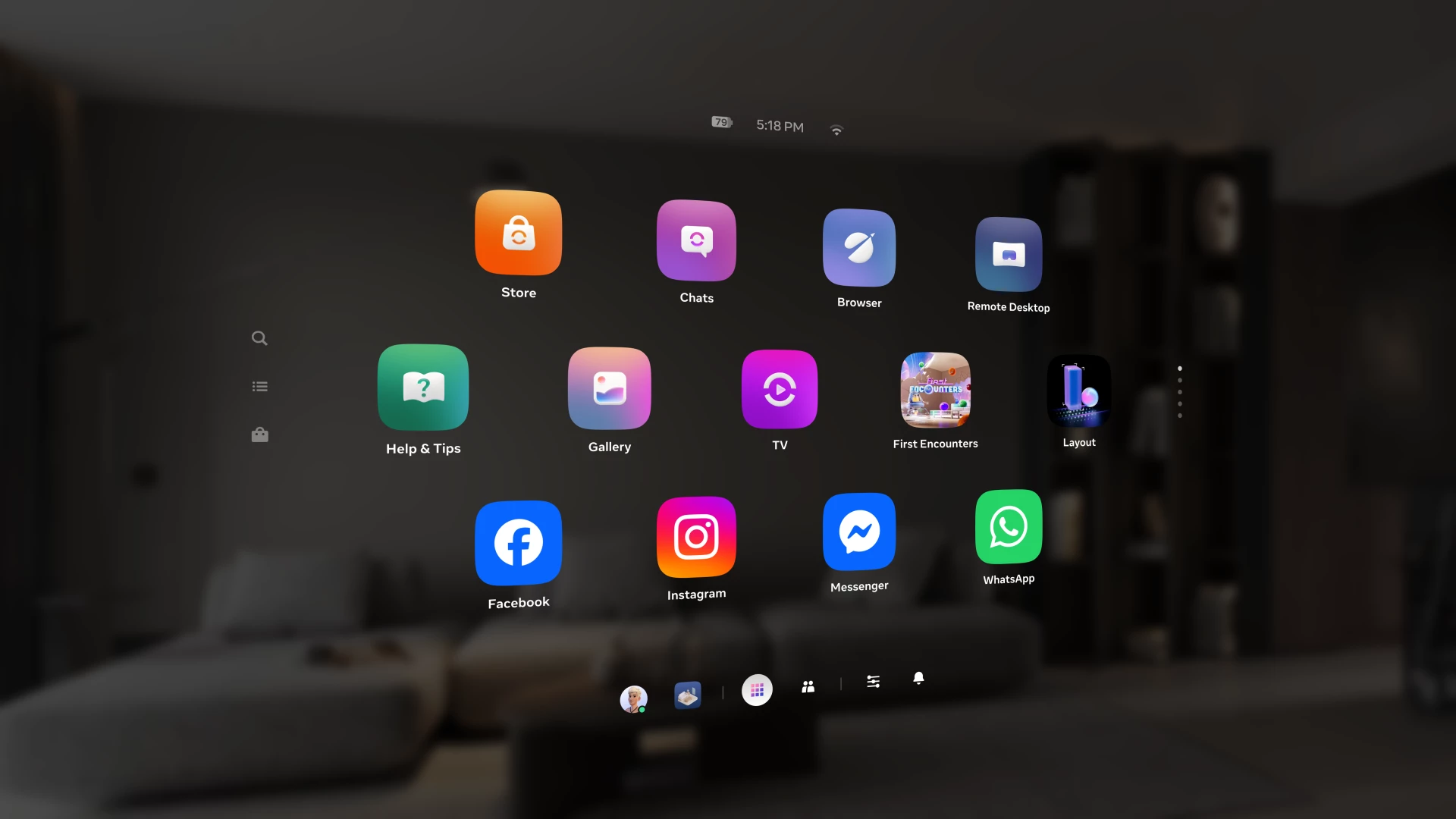
Over the past year, we've been building Navigator β€” a redesigned interface that brings your apps, people, and system controls together in one place. Since we first introduced Navigator, we've heard your feedback and continued to refine the experience. Navigator is now rolling out to all Meta Quest users.

Navigator is now the default navigation experience, replacing the previous Universal Menu to give you a faster, more streamlined way to access everything on your Quest. 

  • One Unified Interface: Press the Meta button to open Navigator. Your apps, settings, and people are all accessible from one place. 
  • Guided Walkthrough: The first time Navigator appears, an in-headset walkthrough will guide you through the new experience so you can get up to speed quickly.

Thank you to those of you who provided your valuable input as we worked to get Navigator ready for broad rollout. Visit the How to use Navigator on Meta Quest | Quest Help to learn more about Navigator, and let us know what you think in the comments.

    This topic has been closed for replies.

    309 replies

    June 3, 2026

    Give Yourself time Folks! I love it. it's great. Poke around with the new interface, it's easy to get used to. I took a few hours looking it over and it's working great. It's True, You Can get used to it. And Don't forget, there will be times when the creators will read what is bothering most folks and they Will work on it. Be Patient. Actually, is not the UI that is important, it's getting to the app, and GO!! Forget all that UI stuff. Head on in there, No matter how many clicks. At least mine works in the old Quest 2. I was amazed. I was smiling with Joy that we finally got that Apple Vision Pro Look, or Phone look. Nice!  Just my thoughts. Cheers!  

    Honored Contributor
    June 3, 2026

    Totally agree. I've seen it develop from something a bit clunky since v79, when I first got Navigator. Now we're v2.4 and it's really come a long way. It's hard to believe, we have people who must have gone through massive UI changes on their Android or iPhone and they just have to get used to it, no rolling back available...... but they lack the ability to adapt to a new UI inside a VR headset that is basically an Android device attached to their face. As a species we have evolved over many thousands of years to adapt easily and relatively quickly to change, often quite massive, and I wonder have some of the human race stopped evolving if they can't adapt to a UI that's a bit different from the previous one and actually closer in function to the mobile phone that's already sitting in their pockets. The amount of angst and complaining over a change that a 10 year old can understand is quite worrying. 

    okeyone
    Up and Coming
    June 4, 2026

    Finally got Navigator I'm one who likes it. My Quest 2 was on the shelf so I figured I should see if it needed updating and holy moly Navigator was already there. I guess waking up your headset for updates works.  I also noticed there are different versions of Navigator.  Going to fire up the Pro today to see what it's got. Seems complaints about Navigator come from Quest  2. It is pretty grainy in pass-through.  Love it on the Quest  3 just looking forward to having the same version as everyone else.

    New Participant
    June 20, 2026

    I've just picked up my Quest 3 after months of not using it. It just updated and I have nothing but disdain for the new interface. I primarily use hand tracking and the new interface is extremely hard to use without the controllers. Having to click into a separate menu to view installed apps is cumbersome and I find myself having to click buttons multiple times for them to register. It was much more intuitive being able to open my app list in a separate window while having my other windows open next to it. I'm even struggling to register buttons while using the controllers. It's such an issue I may just pick my original Oculus Quest back up to avoid using this new UI. 

    Honored Contributor
    June 20, 2026

    Do you have a question about the UI or do you just want to rant? I think there are plenty of ranting forums over on Reddit. We are all just users here, trying to help with specific issues. If you want to complain, complain to Meta through the Horizon app. If you have an issue with your controllers or hand tracking use the bug reporting tool on the headset itself. We've heard it all before, and it's up to you to use whatever Quest you want or no Quest at all. 

    New Participant
    June 28, 2026

    Sorry but this new interface really is annoying. I gave it a chance when it first came out but I am genuinely sick of it. Too many back and forth clicks and just difficult to get rid of the explorer. When will this be reverted back or given the option to select the old interface?

    Honored Contributor
    June 28, 2026

    There is no official way to go back to the old one. Just like when an android or iPhone gets a UI update, they won't revert. I hear there's an unofficial way to do it temporarily but in the end, this is what you will have. So I suppose you can get used to it or buy something else. However, don't be too hasty, I've been using it since v79, got used to it and now would never go back. 

    Someone here might have the link to temporarily revert, but beware it's not official and if anything goes wrong it's on you. 

    Choleni
    Honored Contributor
    June 28, 2026

    Yeah, someone has Maccyb123​ πŸ˜πŸ‘‹ 

    I'm sure, I posted the link somewhere in this thread already...... but here you go GPOdin​ 

    If you don't like the new UI of Meta, you can easily change it back to the old one. Thanks to QGO.

    Just like Maccyb said, this is probably just a temporarly solution. I think, the old UI will be removed from the software completely at some point.

    Participant
    July 1, 2026

    Fantastic... one update later (5216847.5290.520/Q3) and my pinned apps within the neu UI are not "pinned" anymore... even the function is gone, no pinning at all (which should be the root cause). No speak of getting the possibility to "group" the apps, but... "remove from library" appeared...

    What's up with you devs? Are you playing Duck, Duck, Goose with us user?
    Just seed the functions you've announced and stop playing with us!

    okeyone
    Up and Coming
    July 1, 2026

    Hang on I've only gotten a small bit of what the release notes state. It took six months or more to finally get a feature promised was in ver 79. Everyone was getting the Navigator in the public release and me in the test channel just got it about a week ago. I think these mixed releases are for liability reasons because they would be jacked if they bricked everyone at the same time,  Remember not to long ago they bricked a bunch of Quest 2's all at once and said "it's so sad to bad" just order a new headset.  They can't do that to everyone at the same time and lose their base. They've bricked 1 of my headsets and one set of controllers.  Headset had one month of warranty left so they replaced it I'm glad because it was that overpriced Pro. The bricked controllers I had to buy for my Quest 2. My Quest 3 still has 18 months warranty left that's why I'm here lol. So just hang in there things will chang in the next few updates seem they're coming every day or so.  This is my best guess.

    Participant
    July 4, 2026

    It's not unusal to wait a month or so, to activate "new features" to everyone...
    But "never" oder several months later? What's wrong with them?

    Anyway, got with 2.5.1034 (build 5227074.3480.520 retail) at my Quest 3 finally the possibility to "group" my apps/games. No "pinning" allowed either, but grouping is a nice feature nonetheless. Hopefully it will not vanish as the pinning does.

    And it would be nice to get the first page of the library "free to use", to place/order apps'n'games (and folder) like I'd like... as it is on an android handy with the "starting page"... but maybe it stays as dream 😏

    But PLEASE, don't kill "grouping" in the future and gimme "pinning" back!

    okeyone
    Up and Coming
    July 9, 2026

    Oh boy I got update 2.6 but still haven't gotten content from 2.4 I'm excited what next?

    okeyone
    Up and Coming
    August 13, 2026

    Yeah updated to 2.7 and still waiting on 2.4 updates and earlier updates.  I don't understand these updates or rollouts. Lost hear.

    New Participant
    July 19, 2026

    It feels like Meta is trying to make their navigator like the newer Windows start menu. Wonder why since that pos is garbage. This new Navigator couldn't have been tested by any one actually using the device, just some yes-people no doubt.

    Honored Contributor
    July 20, 2026

    missbanjo​  "yes people"? Very politically correct. πŸ˜‚.  Seriously though, I've had Navigator since v79, 7 or 8 updates now and I wouldn't go back. It's very easy to use. I suppose it's only yes people that are able to adapt to change. I must be one of the yes people myself. I wonder if there's a forum where there are lots of "no people" who complain everytime their Android or iOS UI changes which happens far more often than it does on the Quest. Adapt and survive Miss Banjo or stay the same and go extinct. It's a universal rule. Don't sweat the small stuff, there are more important things in life. This particular thread is so old and worn out, it's almost extinct itself. πŸ˜‰ 

    okeyone
    Up and Coming
    July 20, 2026

    I'm a yes people.  Now updated to 2.6 but my yes Navigator is still only partly updated.  I'm one who loves the Yesagator. If you don't like it because it's bad look at the bright side it can only get better.  Me I'm in limbo only having a partialgator. It's all good so keep having fun and enjoy. 

    New Participant
    August 4, 2026

    I have a Quest 2. The entire purpose of the Quest was to be a simple, portable, and reliable VR headset that you could turn on and get into an activity within seconds. Meta has completely thrown those terms out the window.

    With the new UI I am utterly disappointed. The old UI was functional, reliable, and smooth. Very rarely did I have issues and my only request with that UI would have been the ability to resize any window freely which we still do not have. That UI was replaced by something that's hard on the eyes, ugly, confusing, and broken. Ever tried to press the buttons on the left side of the navigator? Don't bother! They don't work and will end up glitching your navigator. At least they replaced the menu logo with a Meta logo, right..?

    The loft was a horrible mistake by Meta. No one wants to live in VR and it's the last thing they should be pushing for. Yet they remove the comfortable and simplistic environment system that had lots of customization for a single "Billionaire's Apartment" style room that has like 6 options of BACKGROUND scenery and the ability to like place your apps around that area as if it were real life. No longer can I have an empty space that doesn't use my headsets resources just to turn on, no longer can I have a cool black covering everything except the apps I am using, and no longer do we get access to the old environments we fell in love with.

    Pushing Quest users to navigate their broken menus in an uncomfortable space with no control over my own device/experience, to spend as much time in their VR "loft" as possible, and to spend more time looking at their store. (Yes, the Horizon Store is still the first thing you see every time you start your $500 VR headset)

    I can confidently say that I will never buy a Meta product ever again. I am repulsed by the decisions made here. As are most users.

    New Participant
    August 16, 2026

    I'd like to ask why the left menu button does nothing within the apps like it used to. You've turned the UI into a troublesome problem trying to figure out what's changed. Give us the option for the old interface.

    Honored Contributor
    August 16, 2026

    missbanjo​ That's not going to happen. We cannot give you the option for the old interface as nobody here works for Meta. We are all just users here like you. There are no Meta community managers here, no Meta moderators here, no Meta staff here. If you want to have something changed, contact Meta support.  We just volunteer our time to help troubleshoot headset issues that we can do something about. For the other stuff, contact Meta support.