

MetaStoreHelp
Community Manager
April 7, 2026

Navigator Now Rolling Out to All Quest Users
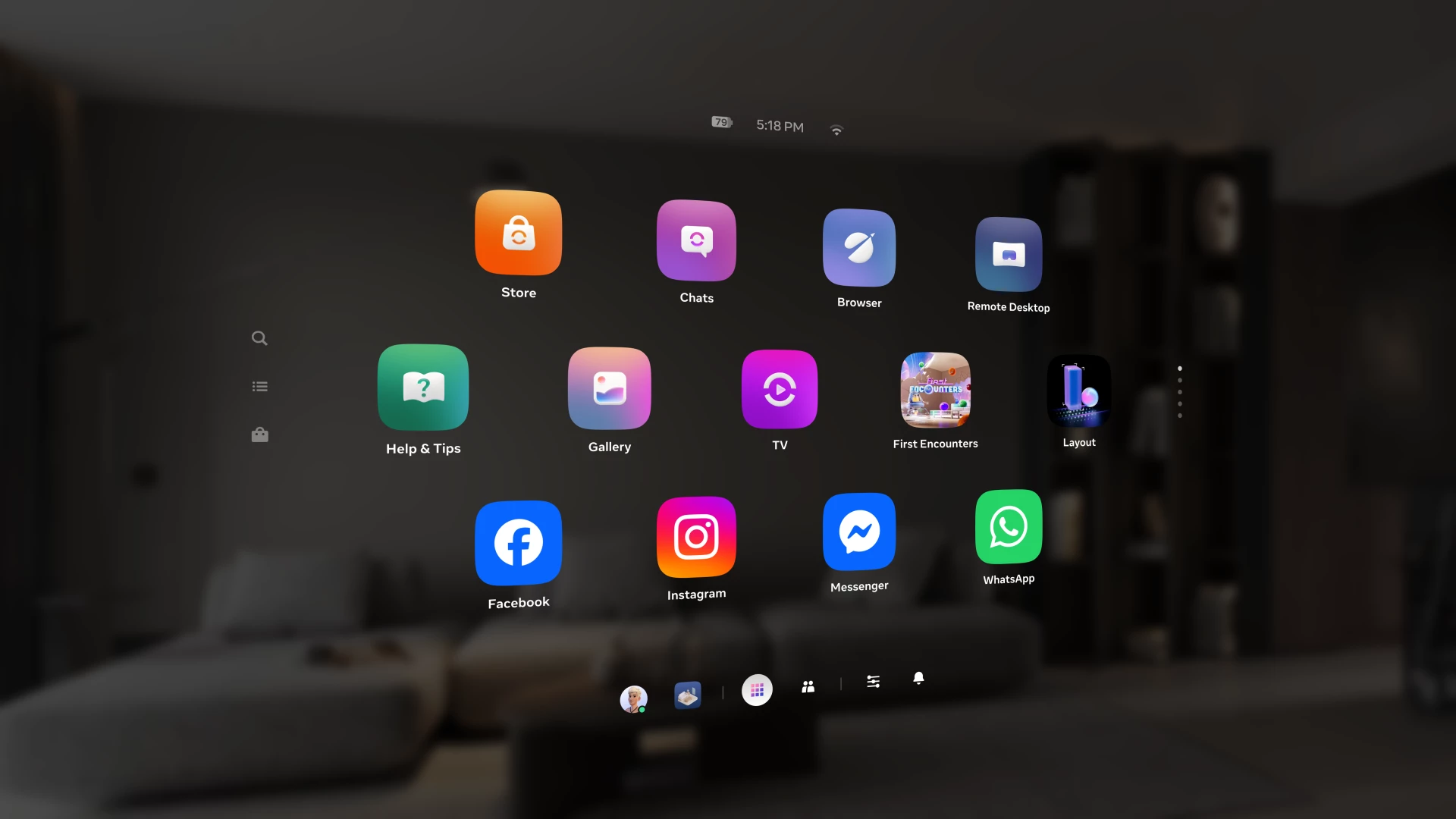
Over the past year, we've been building Navigator β€” a redesigned interface that brings your apps, people, and system controls together in one place. Since we first introduced Navigator, we've heard your feedback and continued to refine the experience. Navigator is now rolling out to all Meta Quest users.

Navigator is now the default navigation experience, replacing the previous Universal Menu to give you a faster, more streamlined way to access everything on your Quest. 

  • One Unified Interface: Press the Meta button to open Navigator. Your apps, settings, and people are all accessible from one place. 
  • Guided Walkthrough: The first time Navigator appears, an in-headset walkthrough will guide you through the new experience so you can get up to speed quickly.

Thank you to those of you who provided your valuable input as we worked to get Navigator ready for broad rollout. Visit the How to use Navigator on Meta Quest | Quest Help to learn more about Navigator, and let us know what you think in the comments.

    This topic has been closed for replies.

    309 replies

    Montago
    Participant
    May 2, 2026

    Just found this command on Reddit , tried it and IT WORKS !

    adb shell pm clear com.oculus.vrshell

    You can run it via SideQuest 

    It will revert the UI to the previous imho, better UI. 

    he said that it might revert if you restart the headset. 

    source
    https://www.reddit.com/r/OculusQuest/comments/1t1mtx0/comment/ojjo579/?context=3

    Choleni
    Honored Contributor
    May 6, 2026
    New Participant
    May 13, 2026

    Dear Meta, please please stop going BACKWARDS! Everything started off good when it first come out, now you are destroying all the well designed things such as the navigator. What is this rubbish? You have to now press more to get anywhere and it's more restrictive! Also give me back the original home worlds- yet another thing you have limited!!!! It's going downhill fast!

    New Participant
    May 17, 2026

    Genuinely the worst update ever. Its glitchy, crashes, battery life is abysmall, they removed the in use sensor that home assistant used to automatically turn my lights on in my room when i put the headset on. Scrolling is broken (resets to the top of the page after every swipe), the navigation bar dissappeared, so doing anything on quest except gaming is now genuinely frustrating, the control panel feels hidden away with the settings button being transparent to the left side. The unknown apps menu got even further hidden away. The horizon store and other meta trash gets pushed into your face, and to top it off, the controllers go empty twice as fast for some reason. I am actively looking to sell my quest headsets, and im buying a steam frame. Its sad meta doesnt take User Experience seriously. This could be a good headset but every month ruin it in a new way somehow.

    New Participant
    May 17, 2026

    I hate this. How can I go back to the old one?

    New Participant
    May 20, 2026

    After update 2.4 in MetaQuest 3, I no longer have the option to disable or enable headset tracking, and it's necessary for playing sim racing on PC. I'm frustrated because I can't use VR with my car motion simulator. I'm really annoyed.

    Honored Contributor
    May 20, 2026

    v2.4 is untested software on the PTC program. These bugs are going to happen. There will be lots of them. Report them through the bug reporting tool on the headset. If you're annoyed, don't be on the PTC program. Leave the program and only update to fully tested software. 

    Honored Contributor
    May 21, 2026

    Maccyb123​  I'm not on PTC and got 2.4 update on my Quest Pro yesterday, so final is probably rolling out now.  Also got a small meta-link pc app update as well.  No big deal as far as UI goes but now Link isn't working as well (lower fps performance and higher battery drain).  I have filed a bug report on this.  Cheers.

    i9 13900K water cooled, RTX4090, Z790 MB w/wifi6e, 64Gb 6400 ram, 2x2TB SSD, 1000W PSU, Win 11, QPro, Q3, w/Link and Air Link, Vive Pro1 with 2x2.0 base stations, Etsy lens mod and Index Controllers
    Participant
    May 20, 2026

    Got it on my 3 devices last night - utterly atrocious. A nonsensical UX designed by absolute fools. When are you reverting it?

    Honored Contributor
    May 21, 2026

    "When are you reverting it?". 

    There is no "you" here. We are just users like you. No Meta employees here. 

    Contact Meta Support directly to complain.

    New Participant
    May 25, 2026

    my headset doesn't even have this version its still the old one

    Honored Contributor
    May 25, 2026

    There is a mysterious roll out, you never know when you're going to get it. 🀞🀞 

    New Participant
    June 1, 2026

    the only thing that makes me really mad about this update is, when you pin something make it show up on the first screen what is the point of pining something if I still have to go into the library to load it. with the old UI i would pin the app and it would show up on the home bar so I could just load it as soon as I put the headset on.

    New Participant
    June 2, 2026

    Am I the only one who can't even find the time of day on the new menus? The old UI had it right on the front page, but I can't find it anywhere. I'm not a child that you can manipulate into letting time fly because I can't see the clock. Also, thanks to the new updates, my Quest 2 takes 45 seconds to load rather than 10-15 as it used to. Horrible, trash update IMO.

    Choleni
    Honored Contributor
    June 2, 2026

    Luketi1​  it's at the top of the Navigator - just like in the picture in the opening post.

    At least it should be thereπŸ™„......it seems there is a bug, the time randomly disappears. Restarting the headset brings it back.

    Send a bug report.