Forum Discussion

Jayombi's avatar
Jayombi
Protege
6 months ago

LINK - No Sound from PC

Link Version :



All set correctly to my knowledge yet, my sound had stopped from PC to Headset and I can not seem to get it back at all.

Reinstalled drivers though Support Directory.

Turned things on and off, etc...

Distraught now as can not play PC VR, everything is silent.


10 Replies

    • Twistian's avatar
      Twistian
      Honored Guest

      Same thing for me. I'm afraid we'll have to wait for another update with a fix๐Ÿ˜–

  • steve_40's avatar
    steve_40
    Honored Visionary

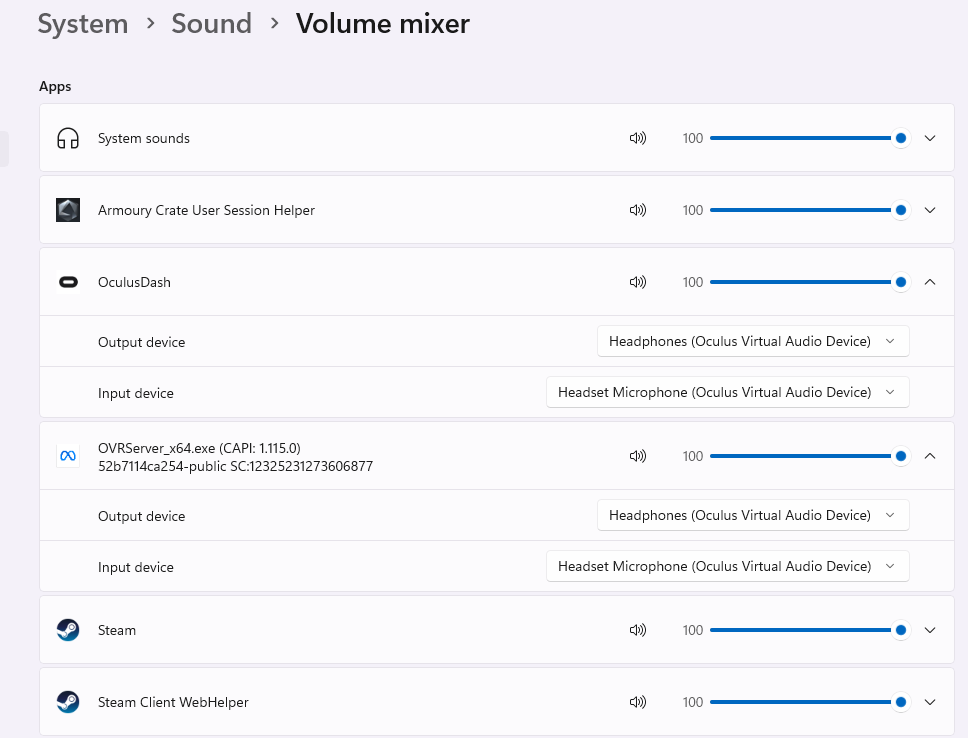
    Problem 1: you should only have 1 output and 1 input device, not 2. Something is very wrong there. Duplicated drivers???

    Problem 2: why the heck is OVRServerx64.exe being listed as an audio device? That should not even happen! The proper app for Meta Quest Link should be OculusDash.exe.

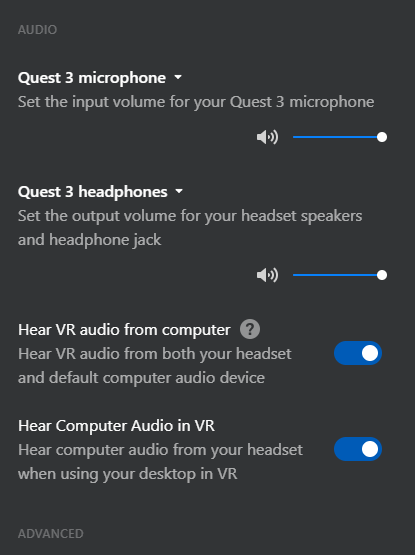
    Problem 3: in the Link PC app, set your audio device to "Use Windows settings" (not Quest 3 headphones), otherwise a small number of games won't have the correct audio.

    Problem 4: you are on v83 which is PTC "beta" version (more like pre-alpha, lol). Expect plenty of bugs and broken stuff!!! This forum is "Link v81 troubleshooting" btw ๐Ÿ™„.

    • Danny_3D's avatar
      Danny_3D
      Honored Guest

      I opted out of PTC and sound is back.

      As an aside not on Beta either๐Ÿ˜

      • steve_40's avatar
        steve_40
        Honored Visionary

        That's good that you got it solved. So it looks like v83 PTC is the cause of the problem.

  • steve_40's avatar
    steve_40
    Honored Visionary

    Ironically, I now also have this problem of no sound. I had just updated to Link v83.0.0.269.349 (non PTC).

    SOLUTION: I ran the app repair tool in Windows and repaired the Link app. After that, Link updated itself again. Then I updated the Oculus drivers again and rebooted the PC. The PCVR sound is working again.