

MetaStoreHelp
Community Manager
April 7, 2026

Navigator Now Rolling Out to All Quest Users
  • April 7, 2026
  • 309 replies
  • 13722 views

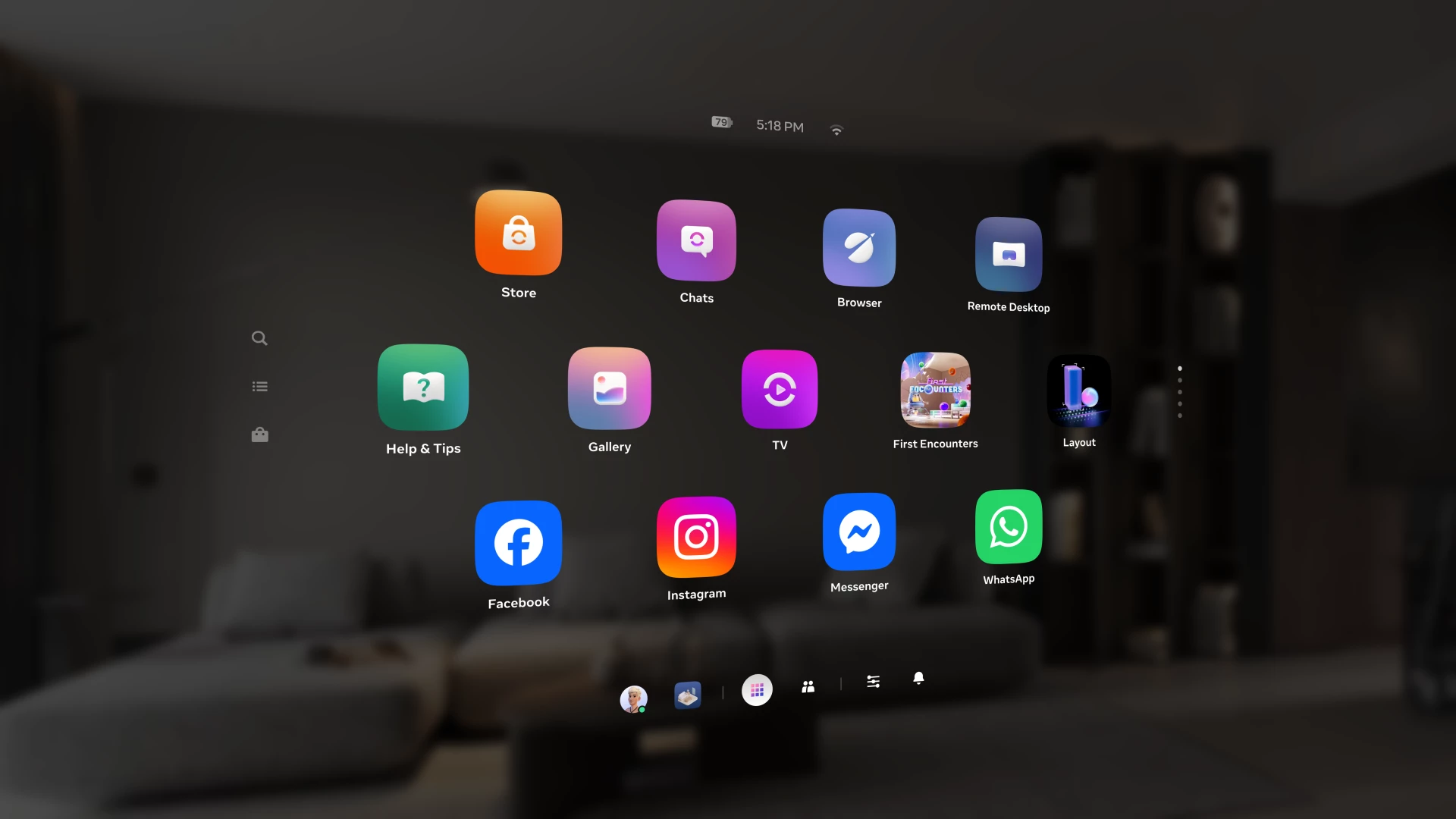
Over the past year, we've been building Navigator — a redesigned interface that brings your apps, people, and system controls together in one place. Since we first introduced Navigator, we've heard your feedback and continued to refine the experience. Navigator is now rolling out to all Meta Quest users.

Navigator is now the default navigation experience, replacing the previous Universal Menu to give you a faster, more streamlined way to access everything on your Quest. 

  • One Unified Interface: Press the Meta button to open Navigator. Your apps, settings, and people are all accessible from one place. 
  • Guided Walkthrough: The first time Navigator appears, an in-headset walkthrough will guide you through the new experience so you can get up to speed quickly.

Thank you to those of you who provided your valuable input as we worked to get Navigator ready for broad rollout. Visit the How to use Navigator on Meta Quest | Quest Help to learn more about Navigator, and let us know what you think in the comments.

    This topic has been closed for replies.

    309 replies

    New Participant
    April 18, 2026

    I really dislike this UI update, as before the bar had so much useful info. I use it mostly like a computer/phone.  I want to monitor battery life of headset, battery life of my controllers, see my apps, etc.  This information is hidden now

    The biggest issue I have is that they removed the time from the UI completely. I can find the date after two clicks, but the time is nowhere to be found!  What a basic thing to be missing from the UI!!!

    Choleni
    Honored Contributor
    April 18, 2026
    nelsonhu wrote:

    The biggest issue I have is that they removed the time from the UI completely. I can find the date after two clicks, but the time is nowhere to be found!  What a basic thing to be missing from the UI!!!

    I also prefer the old UI, but some things people say are simply not true.

    The time is still visible with one click. It's right above the library, or chat, or whatever you've opened. You just need to look up.

    Honored Contributor
    April 18, 2026

    Choleni I'm on holiday so no Quest at the moment. But would you believe before I left yesterday I noticed that the time which was visible is now disappeared from mine even though no new update! 😁 

    New Participant
    April 18, 2026

    Please give us the option to restore the previous Universal Menu!

    The old bottom bar was crucial because it let me check the time at a glance and access my apps instantly without interrupting what I was doing. The new full-screen Navigator update forces me to click and open a whole new menu just to do the same things.

     When I'm trying to work, adding these extra steps is really inconvenient and disrupts my flow.

    Honored Contributor
    April 18, 2026

    Unfortunately it's not coming back  Think of it like your phone. When the old UI is gone, it's gone for good. The Quest is an Android device. No take backs. 

    Montago
    Participant
    April 19, 2026

    After about 2 weeks with this horrible new interface i just visualized a new one with Gemini: 
    instead of having multiple windows, just have 1 that actually works. 

    An interface that make its easy to organize and navigate. 

    When a game or application is running, then the Meta button should "tab out" into a single page that highlights what actions you'd like to invoke, like taking a photo, record it or close. Boundary seems really nice to change on the fly since some games have hickups with roomscale while others dont work well with stationary. 

    So - somewhat what we had before but simplified. 

    feel free to implement it and make everyone happy again 

    Honored Contributor
    April 19, 2026

    Looks nice. There is nobody here from Meta to see it or implement it. You should definitely send it to Meta through their website. 

    New Participant
    April 19, 2026

    It needs an option to adjust the transparency, it's really hard to focus on the icons when stuff is moving around in the background.  

    Also is it just me or is the text fuzzy?  It seems if my head isn't exactly at the correct angle all the text fuzzes out.  I tried to take a screenshot but it looks perfect in there.

    New Participant
    April 19, 2026

    Thanks for the update!

    Navigator looks like a solid improvement—having apps, settings, and social features all in one unified interface should make things much more intuitive. The guided walkthrough is a nice touch too, especially for users adjusting from the old Universal Menu.

    Curious to see how it performs in day-to-day use, particularly in terms of speed and ease of navigation. Looking forward to trying it out!

    New Participant
    April 20, 2026

    I just want to know what time it is from the UI again. Im having to google it now in the headset

    Honored Contributor
    April 20, 2026

    glennkiser3​  Just press your right meta button and select Library (square with lots of dots) from the dashboard.  At the very top of this you can see your battery levels and time.  I admit it was a little easier to have the time pasted on the startup dashboard.  Cheers. 

    i9 13900K water cooled, RTX4090, Z790 MB w/wifi6e, 64Gb 6400 ram, 2x2TB SSD, 1000W PSU, Win 11, QPro, Q3, w/Link and Air Link, Vive Pro1 with 2x2.0 base stations, Etsy lens mod and Index Controllers
    New Participant
    April 20, 2026

    The new ui is absolutely dumb to force on us. I have no intention of learning a new trash ui when the old one worked great. Mine is going on ebay, or throw it in the corner and wait for the jailbreak to fix this. Ill never make another purchase on my quest 3 again because i dont even know how and im not going to try and learn this thing all over again. 

    New Participant
    April 20, 2026

    Any one want to buy a quest 3s with only about 30 hours of use? Very cheap. 

    Its a good thing we have a choice,  if you dont like the new ui, steam will soon release there new headset and it will have a great user friendly ui. 

    Honored Contributor
    April 20, 2026

    I'll give you $50 for that, lol!  That's the usual offer I give friends who buy any decent gear and then find they don't want it anymore.  Cheers.

    i9 13900K water cooled, RTX4090, Z790 MB w/wifi6e, 64Gb 6400 ram, 2x2TB SSD, 1000W PSU, Win 11, QPro, Q3, w/Link and Air Link, Vive Pro1 with 2x2.0 base stations, Etsy lens mod and Index Controllers
    New Participant
    April 20, 2026

    Tempting,  but i can get a little more on ebay. 

    New Participant
    April 20, 2026

    How do I opt out of this update and go back to the old update? 


    Is anybody else frustrated that you can no longer use Multitasking Audio Sources? For example, when I'm playing Poker, I was able to snap Youtube and listen to my favorite show or music Now when I have any windows open in the background, I am not able to control my game. If I am in a phone call and using bigscreen app My videos pause. Unless I mute the video, then it will play. Can somebody please explain why they disabled This feature? I don't feel like it isn't a glitch. I feel like it Was purposely taken away.. Maybe licenses? But I'm going to revert back to my old question. How do I opt out of this update and go back to the last one? Because the fact that I can no longer multitask while doing what I want to makes me want to sell both of my Quest. I mainly was specifically excited because you can multitask while watching multiple videos while playing games or doing whatever you want.. And then they took it away.. I've seen cellphone companies in consoles do this in the past.. Extremely frustrating Mister zuckerberg. .  #zuckerberg I would definitely say it brings the value of Meta quests Way down considering on the capabilities that you can no longer have And you were once able to do it flawlessly 

    Honored Contributor
    April 21, 2026

    Short answer to your long comment.. You can't opt out and you can't go back. 

    New Participant
    April 20, 2026

    To the people who do not have this update yet do not feel bad because you are not missing out. In fact, I am jealous that you still have your old update. Please let me back