Recently active
So my facebook account was suspended because a meta issue, i spoke with meta support via instagram.They're saying I have to come here and ask them to fix it.How do I contact an actual person here.
Hello Everyone! Looking for some assistance to get my Oculus Rift S working or atleast to diagnose what is going on. USB is connecting, DisplayPort is not. App says a Firmware update is required, but it fails instantly. Have plugged and replugged the cable at the headset, connected USB waited 10 seconds and connected the DP. Reinstalled App and drivers, ran things as admin. Is there any way to better troubleshoot? or can the firmware be performed via cmd? or with another util? any assistance appreciated. I have been unable to raise a Meta support case as my account has not yet connected with this device.
When we want to Link VR to pc it says that my son needs my permission. For any app he can send a request, but for this link i just can't find what were i have to give permission.We have a link with his phone on which he has the meta horizon app. He can play. I installed de app on the pc.
Bonjour,actuellement sur asghard'swrath 2 le jeu s'arrête en me disant que j'ai un problème de mémoire insuffisante. J'ai 128GO de mémoire dont la moitié d'occupé. Les applications semblent fermées et je ne dois utiliser que le jeu.. C'est surement un problème de RAM ? svp. Merci
I’m experiencing an issue while playing Beat Saber.My current Beat Saber version is v1.42.0. Previously, on OS v83, the game launched and worked normally. However, after updating to OS v85, the game gets stuck on the loading screen.The screen turns completely black with white stars. I can only see two black controllers and two footstep icons. When I move the controllers in this dark space, I can still hear sounds.I’ve tried uninstalling and reinstalling the game multiple times, but nothing has changed.Please let me know what I should do next.
I installed this application on my laptop without any problems but if I ran setup file on PC there is an error (screen attached) that immediately appears. Why does this happen? Antivirus is turned off.
On December 29, 2025 I received an email stating that my account had an email added to my contact information. I was waking up in the morning and was an action I did not trigger, so I inmediately logged in to remove it and change my password. I was not quick enough to log in, navigate the facebook menus and find the email to remove it (the emails with the meta codes was me attempting to log in). This change was followed with four unauthorized Meta Horizon (Oculus) transactions for the quantity of $330.28 on my linked paypal account. I then proceeded to change my password and unlink my paypal account from Meta to stop the bleeding. After that, when I logged into my Oculus headset, a message appeared saying "Removing all files" and my Oculus Meta Horizon account was gone. Now I cannot cancel the transactions as I no longer have access to the accounts "transactions" in order to cancel or report fraud on them. (Emails in order as received on December 29). I still have acces
Hi there,I am new on here and to meta quest in general. I have a very frustrating problem, which I hope someone can help me with please or advice me who to contact about this. I have already gone through the trouble shooting options for the battery and battery issues and I have just submitted a request for help with them with my evidence.On the headset charging port on the outside, the plastic melted, (and could have caught fire, if I didnt notice it!). The charging lead itself that came with it has slightly melted too. Since then, I have used another correct USB C charging lead into the port and it has worked, it has charged. I also have an official charging dock and it has worked.Now however, I have come to use it and it will not charge at all. There is a battery symbol showing a low red battery line with a bolt of lighting (with a line through the bolt of lighting). It does not matter if it's on the dock, or if I use the lead directly; It will NOT charge. I have only had
Sorry was not sure where to post this, looked into Meta's feedback and its a maze with no options for general feedback.I started VR with a rift, I moved on the Quest 2 then Quest 3.I was not naive but I did try to defend Meta against unfair attacks, while the company had its issues it has always been the one company trying to get VR off the ground, Sony and Valve basically dropped a couple of games then ignored it.I held my nose through the mandatory Facebook account era, I moved on when Echo Arena was closed, I let it go when GTA San Andreas VR announced by Mark was quietly forgotten.But today feels like the last straw for me, Arkham Shadow sequel was my most anticipated game and while it was never confirmed it was clear the team was ready to go with an ambitious small open world type sequel that would really expand what was possible in VR. Instead we get news today that its all over, no more Asgards Wraths, No more Arkham Shadows no more Deadpool.It feels like Meta has given up
Recently for the past month i have been trying to buy stuff on some of my games but the purchases have been not going through, it says to file an appeal and that something looks suspicious. I am getting really ticked off by this so if anyone can help that would be great.
How do you make 2 objects collide in horizon worlds? when I try on colision with object it refuses to acknowledge this
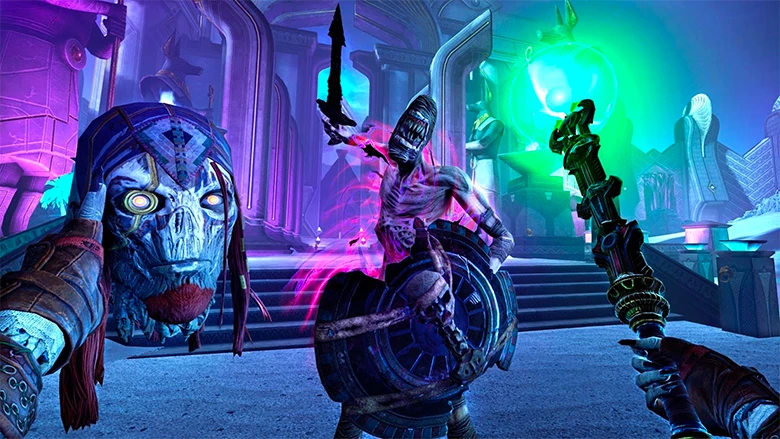
Loki’s chaos must be stopped. The fate of reality is in your hands in Asgard’s Wrath 2—only on Meta Quest. Check out the official player’s guide on the blog: https://www.meta.com/blog/quest/asgards-wrath-2-players-guide-game-overview
I use and own a meta quest 3S but I cannot see anything about communities I looked in my chats app and there is nothing, I looked through my setting to find any updates but there is none. I am trying to fox this since all my friends have communities except me.
I was very excited when I bought the Meta Quest 3. The games are excellent, Virtual Desktop worked well, and overall the experience was genuinely impressive.Unfortunately, just 2.5 weeks after the one-year warranty expired, the headset suffered a non-recoverable hardware failure. Based on extensive troubleshooting with Meta Support, the internal flash storage appears to have failed or become corrupted. Factory resets, recovery mode, and all supported repair options were attempted but the device could not be repaired. I requested a courtesy warranty exception given how close this was to the warranty expiration and the fact that this was clearly not misuse or user error. After much back-and-forth with Meta Support, they refused. The only option offered was a refurbished replacement for $360, with a very limited warranty. This experience significantly changed my view of the product and Meta's support policies. The Quest 3 is impressive when it
Hi was wondering what to do? The pin/bar that holds the strap in place just snapped in half on my son’s brand new quest 3! He’s gutted 😭 Can’t believe something we’ve saved up and paid that much for broke so easily. It seems poorly designed. Any idea if we can get it replaced or something? Thanks
So I keep trying to use Beatsaber, it logs in, but I get stuck on the health warning screen. I can't click continue, it just shows feet on the ground with a controller. I tried putting everything on the ground, nothing. I hit ALL the buttons, nothing. I can't get past the screen. I restarted the headset, shut it down and rebooted from powered down, I uninstalled and reinstalled the app 2xs, still same thing, just stuck on the health screen and can't move past. Anyone know how to get into the game?
I already enabled the options the app needs so it can connect to my meta quest 2 and it's also registered there but still it says "please enable the needed permissions"
I need help asap, Injust bought my meta headsets and it’s not letting me purchase any app!!
they say the product doesent have support but its a brand new quest 3s, it appears a yellow damage in the screen
I have enabled hand tracking, removed the controllers out of headset sight, but it doesn't switch to hands.I just don't have any hands🤷Does anyone here know what I'm doing wrong and what I can do to fix this?
My VR headset has stopped working properly recently. Whenever I try to start Oculus Link, I just get a black screen. When I try to run oculussetup.exe, it throws an error saying it can't find oculusclient.exe.I've reinstalled the software multiple times, but nothing changes. I'm stuck and can't use my VR at all. Does anyone know how to fix this?
Hello there,I`ve bought Oculus Quest 2 and wanted to pair it with Horizon Link I`ve downloaded mobile app then opened it and started pairing process, so I also have turned on my Oculus Quest 2 then typed 5-symbol code to app and it was paired successfully, I can see it in my devices but there is a problem - Mobile App said that I need to continue configuring my Oculus Quest 2 actualy on my device, but then I weared it on there was nothing changed, It steel shows link code and nothing happens. Then I also tried to reset it with recovery mode -> went to boot menu and selected factory reset, when it booted it steel shows this link code and steel nothing happens. Did someone had same issue, how did you solved it ?
My Quest 3 Mic works completely fine in headset native games, I cannot get it to work via Meta Link. I have tried reinstalling and repairing the Meta Link app, go through windows registries and reset tons of audio components and nothing has seemed to work. The Oculus Virtual Audio Device is listed in my devices and is not disabled, and its stuck at 50% audio level. I have also used a Rift S under the same Oculus Virtual Audio Device input when connected to the PC in the past. Since then I removed it as a device, and tried to delete any files that might be under Rift S. What could be the problem?
So I’m trying to buy something on my Meta account, but I’m hit up with request cannot be completed until further action and I was wondering how I can fix that because I have tried so many ways and it has not worked
I need help to take Meta of my account
Already have an account? Login
Enter your E-mail address. We'll send you an e-mail with instructions to reset your password.