Recently active
Pls I am begging u guys and the company to pls reinstate the meta quest 1 to be able to participate in online games and events. Not only will it make the company and the programmers more m9ney but ingage more players. So pls i am begging una
Hello, I hope someone can help me because I am completely stuck. After performing a factory reset on my Meta Quest 2, I can no longer complete the initial setup. The headset connects to Wi-Fi without any issues. It then displays the 5-digit pairing code and asks me to continue the setup using the Meta Horizon app. The Meta Horizon app detects the headset, but the setup never finishes. The headset remains permanently on the pairing screen. When I try to use the Cast feature, the app only says "Searching for headset..." forever and never connects. I have already tried: Factory reset multiple times.Two different Android phones.Reinstalling the Meta Horizon app several times.Clearing the app cache and data.Enabling all required permissions (Bluetooth, Nearby Devices and Location).Making sure both devices are connected to the same Wi-Fi network.Restarting both the headset and the phone many times. The headset was purchased new from Amazon about two ye
Hi,I'm trying to recover access to my old Oculus account purchases that I used with Samsung Gear VR.I recently brought my old Samsung Galaxy S8+ and Gear VR back to life. I managed to install and launch the original Oculus/Gear VR software and all required Oculus components successfully.The first problem is that I cannot log into the Oculus app.The legacy app still offers Oculus login and Facebook login. My old Oculus credentials no longer work, and the new Meta account I have created cannot be used to log into the legacy Oculus/Gear VR application either.I then discovered that my old Oculus account had been deleted because I did not complete the migration to a Meta account before the March 29, 2024 deadline.is particularly important to me because I purchased a number of games and applications directly from the Oculus Store for Gear VR, and I would like to regain access to that library.I still have access to the original email address associated with the old Oculus account. I also have
Hello, everytime I launch the Meta Horizon app I get a graphql error code 3571065. What does this mean? I'm on Android. I've deleted the app data/cache, restarted my phone, reinstalled the app... Got it working. How do I delete this post? I can edit. I don't see a delete buttonh
Hello, I’m at a loss. I’ve tried everything.On the Gro game I have no hands and connecting fails. In the Gro lobby I have hands once it loads initially I don’t. On Gorilla tag I can’t enter a code to join on the computer within the gameI have hard reset, deleted on device files, turned on/off hand gestures vs real hands, knocked the controls together to activate controls, changed height, cleaned lenses, restarted wifi, uninstalled the game and reinstalled, created a new profile and downloaded the game and same problem. Any ideas?
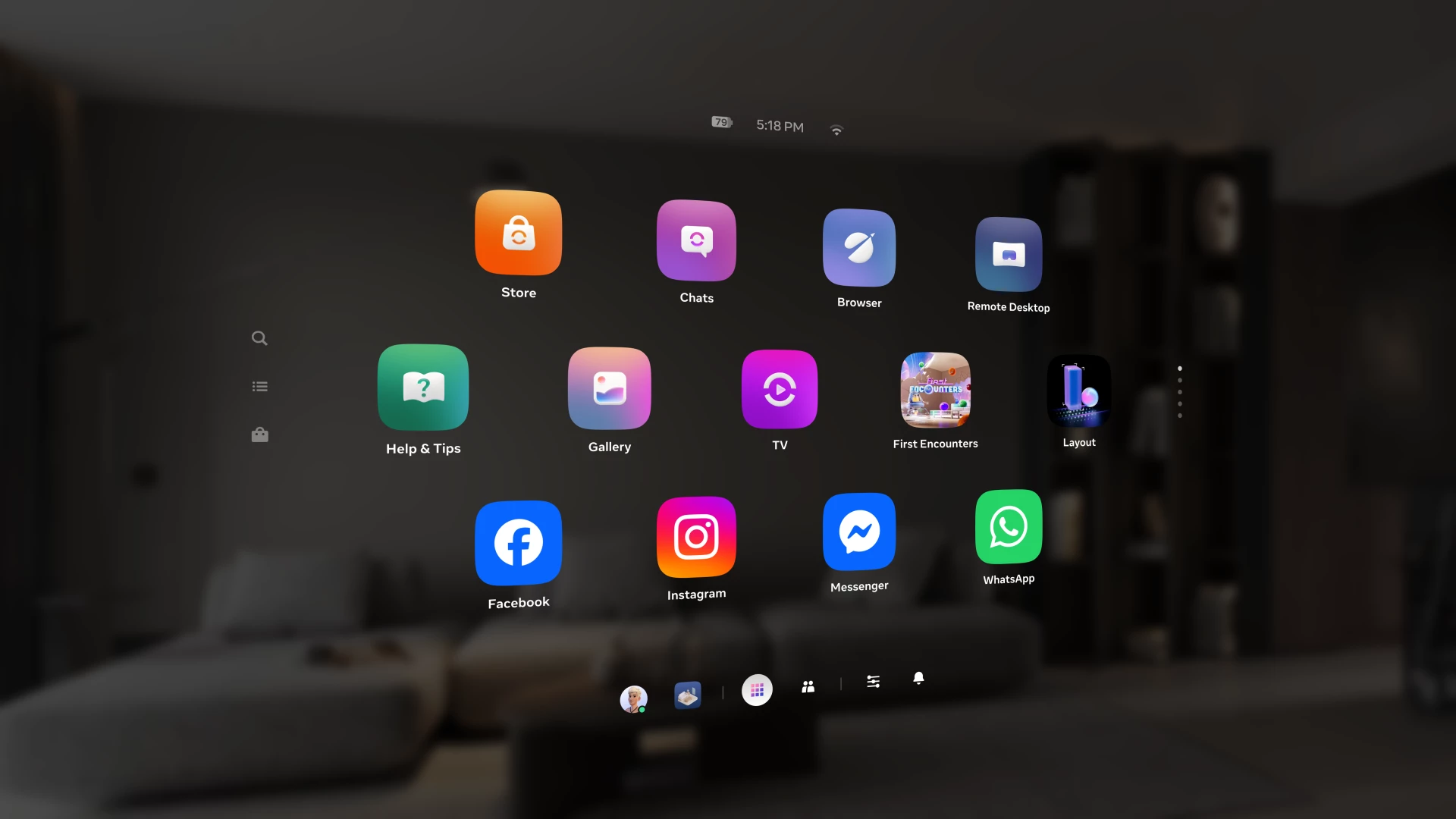
Over the past year, we've been building Navigator — a redesigned interface that brings your apps, people, and system controls together in one place. Since we first introduced Navigator, we've heard your feedback and continued to refine the experience. Navigator is now rolling out to all Meta Quest users. Navigator is now the default navigation experience, replacing the previous Universal Menu to give you a faster, more streamlined way to access everything on your Quest. One Unified Interface: Press the Meta button to open Navigator. Your apps, settings, and people are all accessible from one place. Guided Walkthrough: The first time Navigator appears, an in-headset walkthrough will guide you through the new experience so you can get up to speed quickly. Thank you to those of you who provided your valuable input as we worked to get Navigator ready for broad rollout. Visit the How to use Navigator on Meta Quest | Quest Help to learn more about Navigator, and let us know wha
Does anyone know how to improve focus when playing in the Xbox cloud Games app? I have a problem with fortnit because I tried in every way I know and the sharpness is tragic I have a 5G connectionI play in meta quest 3s
Headset: Quest 3 Horizon OS version: v2.7 (not enrolled in PTC — this landed on general release) Streaming setup: Virtual Display, PC on EthernetSince updating to Horizon OS v2.7, I've been getting intermittent black screen flashes while streaming my desktop. The screen blanks out for a moment and then comes back — but my mouse cursor stays visible and responsive the entire time, which tells me it's not actually disconnecting.This started right after the v2.7 update. Before that, streaming was stable.PC specs:GPU: AMD RX 6700 XTConnection: Ethernet (PC), 5G WiFi (Quest 3)What I've already ruled out on the PC side:Clean GPU driver reinstallRolled back GPU driver to an earlier version — issue persistsDisabled MPO (Multi-Plane Overlay)Disabled FreeSync / Enhanced SyncDisabled Hardware-Accelerated GPU SchedulingChecked Event Viewer for TDR events (Event ID 4101) — none found, so it's not a driver crash/recovery loopRepaired the Virtual Display / reinstalled the Windows App on the headsetSi
Anyone know the solution to this as I'm going bald pulling my hair out!!Meta Quest 3 - Contractors original game has started dropping the wifi and crashes the game within a minute every time I start it, not only that, it messes with the house wifi and causes my wife's and son's iphones to lose their wifi connections temporarily. Only happens with Contractors, I can play Forefront with no problem.I've tried restarting the hub, reinstalling Contractors, clearing the app date, changing the wifi channels and hard booting the Quest 3 (and loads of other stuff that hasn't worked). I'm reluctant to factory reset the headset as that would cause me to lose everything and take forever to reinstall it.It just seems weird that only Contractors is causing an issue with the home wifi.Just FYI the hub is a few feet away from me so signal strength isn't an issue, I have a couple of 'repeater discs' around the house so pretty much everything works on 5GHz.
I got a controller update two days ago, since then, the controllers do not wake up from sleep when they are laid aside for some moments. This was a problem in earlier days with the quest controllers which vanished completely a year or two ago. I am really annoyed that this bug has been brought back by an obligatory update. And it seems, that I am not the only user noticing this.I tried undpairing and pairing the controllers to no avail. There doesn't seem to be any solution at hand and this really kills the joy of using my Quest 3 headset.Could you please check if older code has found its way in the once fixed firmware again as it sure seems so (or maybe it could be a related bug).Thank you and happy questing.
Basically when i wanted to make a purchase, I couldn't, and this message kept popping up saying "Request Cannot be Completed until Further Actions." Probably because I entered my pin incorrectly like once or twice. But Now i can't buy games on my account. Is there any issue to resolve this?
I factory reset my Meta quest three and now it does not show a personal code. It shows an organizational code and no way to move on. So how can I get the personal code when I can’t get into the Meta quest headset?.
Notification appears every time I try to boot Link.This is a recent issue I have run into since the software was butchered last month. So what's going on with this notification? What on earth is even causing this issue? Nothing that the community have found that would get around this issue works anymore as it's the same error over and over, I have reinstalled the software at least 30 times by now just so I can get thing to connect to oculus dash and it won't even do that.So where is this support article that the notification claims to exist because when I click on it to open the article....I get my account's friends list instead. WHOOPS.
Does Meta have a old library or something of older versions of the app? I need between Version 13-16 that came out in 2020 of the app: https://en.wikipedia.org/wiki/Meta_Horizon_OS_version_history#:~:text=v13The reason is because years ago Meta updated the app and made it where my computer is 'too old to run the Rift S.' and 'Doesn't meant the minimum Requirements to run VR.' But that isn't true. I've played through the entirety of Walking Dead, Half-Life Alyx and a ton of other VR games just fine until Meta stepped in and made my Rift S literally unplayable.A story on how I figured this out. Years ago I spent weeks with Meta support, thinking my Rift S was broken. Sent it out for repairs, got a replacement, and so much more. Meta also kept CONSTANTLY saying that it's not possible for my PC to run VR, and I had to keep yelling at them that it very much can.It wasn't until my friend found out when I was angry as hell in a Discord call. He said 'it's most likely their app thinking y
I have been putting off the update for a couple of weeks and decided to get caught up tonight. Now my CV1 is unusable. No display and it keeps saying that the tracking quality is poor. It was working fine earlier today. Anyone else experiencing issues?
I've gotten slightly tired of repeating all the awesome stuff about the Oculus CV1 on Oculus Subreddit and in here - so why not try to collect all the great arguments for still using the Rift CV1 in a thread? 1. It's oled. Even with the oled mura (SPUD) Rift CV1 is still a lot darker than lcd hmds. It may not matter to all, and sure you can live just fine with lcd, but for those of us wanting to experience a really dark night in Skyrim, wanting to have true night vision in Saints and Sinners (and not constantly needing a flashlight) - and to enjoy all the very dark horror games - oled is still king. Although Rift CV1 and the original Vive aren't completely the same, they both use oled panels - and these results indicate differences in blackness comparing oled (Vive) and lcd (Index) hmds: "Black level in nits: Index: 0.153 Vive: under 0.02 with true blacks turned off via black smear compensation (default). Vive: 0 with true blacks turned on, black smear compensation dis
It’s all in the title
It'll start installing, but in the final half randomly it'll stop and say I need to restart my computer. I've tried:Restarting my computerDeleting the temp cache folder in my main driveDeleting the folder in appdata I have no more ideas. Any help?
The machine powers on and you see the logo, after the logo, my family of four, four profiles show up. When I click on any of the profiles there is nothing on screen, I just see my living room.Holding the Meta logo button does nothing.How can I get the display to appear?
As the title says, I gifted my friend Deadly Delivery on the Meta Quest store, and although I got the email that he accepted it and can see on the store page that he owns it, the game won't appear on his library nor does it allow him to download it from the store page. Instead the game appears with the price greyed out. If he tries to install the game through the phone app, nothing happens when tapping "Install on headset". He doesn't play a lot of VR, but I've never had an issue with gifting a game before.
Hi guys,long time Meta Quest user here. This is more of a complaint about the recent QA at Meta for the Meta Horizon Link app on pc, than an actual call for help - however: if you got any recommendations on how to pair my Quest 3 device without uninstalling everything (including all folders and cleaning registry), i appreciate it.I guess every long time Meta user knows, that Meta's horizon pc software lacks usability/stability from time to time. I got myself an enthusiast dedicated wifi6e router setup (pc wired connected oc), a NASA PC that is ALWAYS perfectly up to date (drivers, windows 11 updates, etc). In general i would make the claim, that i find solutions for every minor hickup connected with wireless pcvr on a MEta Quest HMD (Q2, Q3 day one...).Virtual Desktop is my daily driver for wireless streaming, because auf its usability, AV1 codec, and its stability (you know: all the things air link is lacking...) However, for some usecases i use Steam Link for some others i use air li
Hi! I need assistance regarding a Meta Quest 3 headset that appears to be hardware-banned from Meta servers. I recently purchased this device second-hand. After performing a factory reset and attempting to set it up with my personal Meta account, I encountered an authentication error. Checking the device logs via ADB revealed the exact error: Error 400 — Subcode 2699019: "Device Banned From Authentication: This device has been banned from Meta servers and authentication." The automated Meta Store Support website rejects my serial number, stating that support is unavailable for this device, which prevents me from creating a regular support ticket. I am the new, legitimate owner of this headset and had no involvement in whatever caused the ban under the previous owner. I can provide the serial number, photos of the device, proof of my purchase, and full ADB logs. Could a community manager please help me escalate this to the appropriate internal team or manually open a support case for in
Pls help the controllers not working
This has happening to me for awhile but whenever I try to buy a game it tells me that it noticed something unusual and for safety my request could not be completed
Hi all, I've been having a weird issue with my son's Quest 2 since the last update. I'm the device owner, and he has his own profile on the headset with app sharing enabled. The problem is that no matter what game he launches, the controllers and hand outlines remain visible. This only happens on his account—my account works fine. I’ve tried a bunch of troubleshooting steps:• Removing and re-adding his account • Turning off experimental settings • Clearing all boundary data • Toggling body and hand tracking on and off • Disabling auto hand tracking switching • Doing a full factory reset on the headset Before the factory reset, there was also a window handle (Small white floating bar) with no window attached constantly on the screen. It appeared in both the Quest home environment and in games, and though it could be dragged around, it didn’t seem attached to anything. The window handle hasn’t reappear
Already have an account? Login
Enter your E-mail address. We'll send you an e-mail with instructions to reset your password.